
Catch overloaded teammates before the week starts.
List, board, calendar and timeline views over one set of tasks — every project gets a board automatically, and rules move cards along as the work progresses.
What makes it unique
The features that set Task Management apart from a generic ERP.
These are the workflows big ERPs either skip or get wrong.
Five views, one data source
List, Kanban Board, Calendar, Timeline (Gantt) and Workload — same tasks, five ways to look at them. Switch views without losing filters or sort order.
Auto-built boards on project create
A new project spawns its task board automatically from a template — stages, sections, tasks, milestones and role-based owners. Nobody has to "remember to set it up."
Plan with dependencies and a Gantt
Link tasks with FS/SS/FF/SF dependencies, set milestones and let the Timeline draw the Gantt and highlight the critical path. A baseline snapshots the agreed plan so you can see slippage against it later.
Event-driven automation rules
Rule: when a task moves to a stage, change its status, bump priority, update progress or reassign it. Per-board rules that run automatically on stage, status and priority changes — no manual updates.
Recurring tasks, calendar-aware
Set a task to recur daily, weekly or monthly so routine work regenerates itself on schedule instead of being re-created by hand each time.
Mentions + comments + attachments
Mention a teammate, leave a comment, attach a file — they get a notification and the action shows on the task activity trail. Real collaboration, not a checklist.
Feature 01
See instantly who on your team is overloaded.
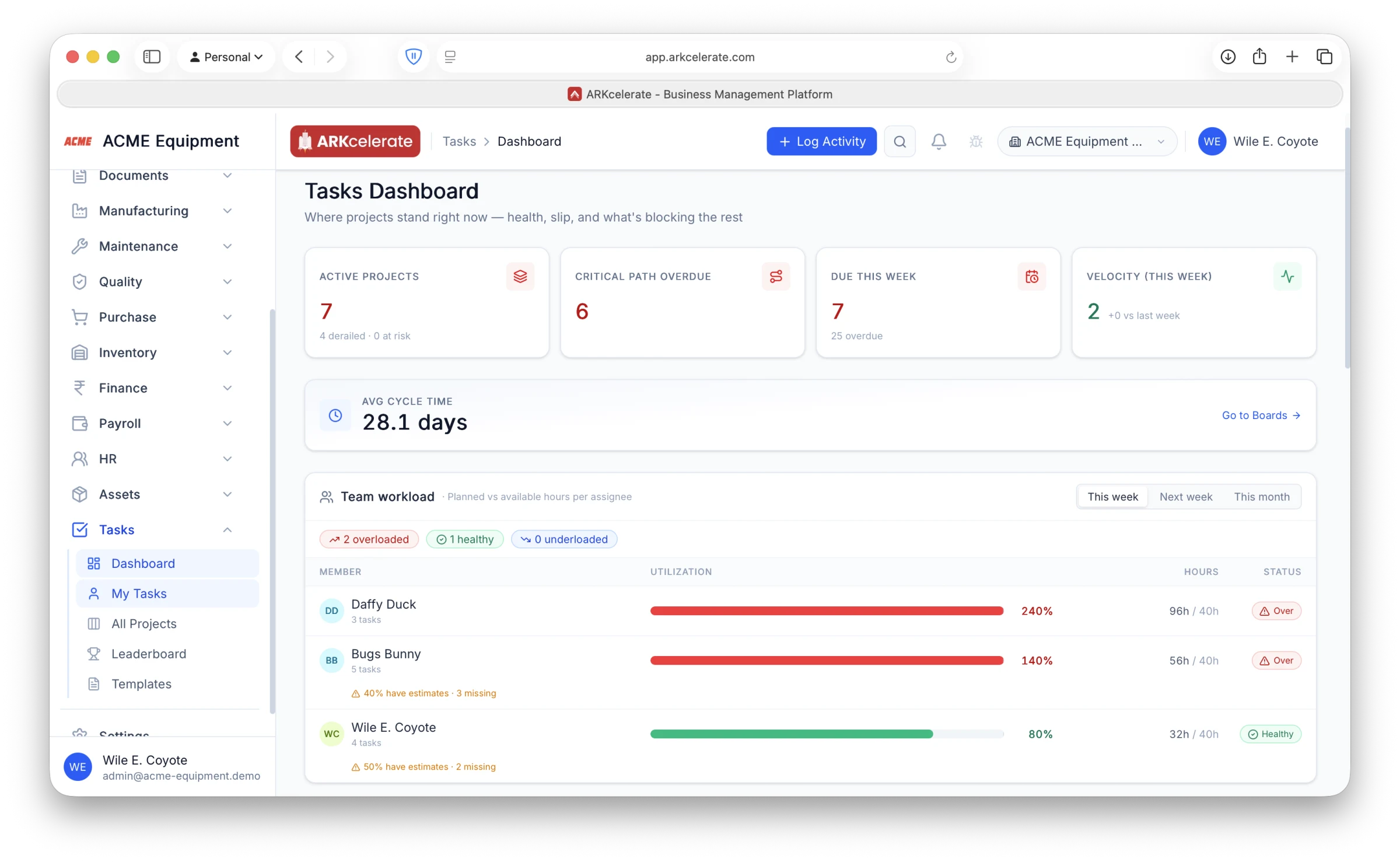
The Team Workload panel adds up every assignee’s planned hours and compares them against the hours they actually have, so an over-committed person shows up in red before anything slips. Daffy at 240% and Bugs at 140% are clearly drowning while others have room — drag work across and the bars rebalance. The dashboard around it tracks the numbers that matter on a project floor: active projects (and how many are derailed or at risk), critical-path tasks overdue, work due this week, velocity and average cycle time.
- Planned vs available hours per person, with utilization %
- Over / Healthy / Underloaded flags — overload turns red
- This week / next week / this month horizons
- Warns when an assignee’s tasks are missing estimates
- Project-health KPIs: at-risk projects, overdue critical path, velocity, cycle time
Feature 02
A personal “My Tasks” page for everyone.
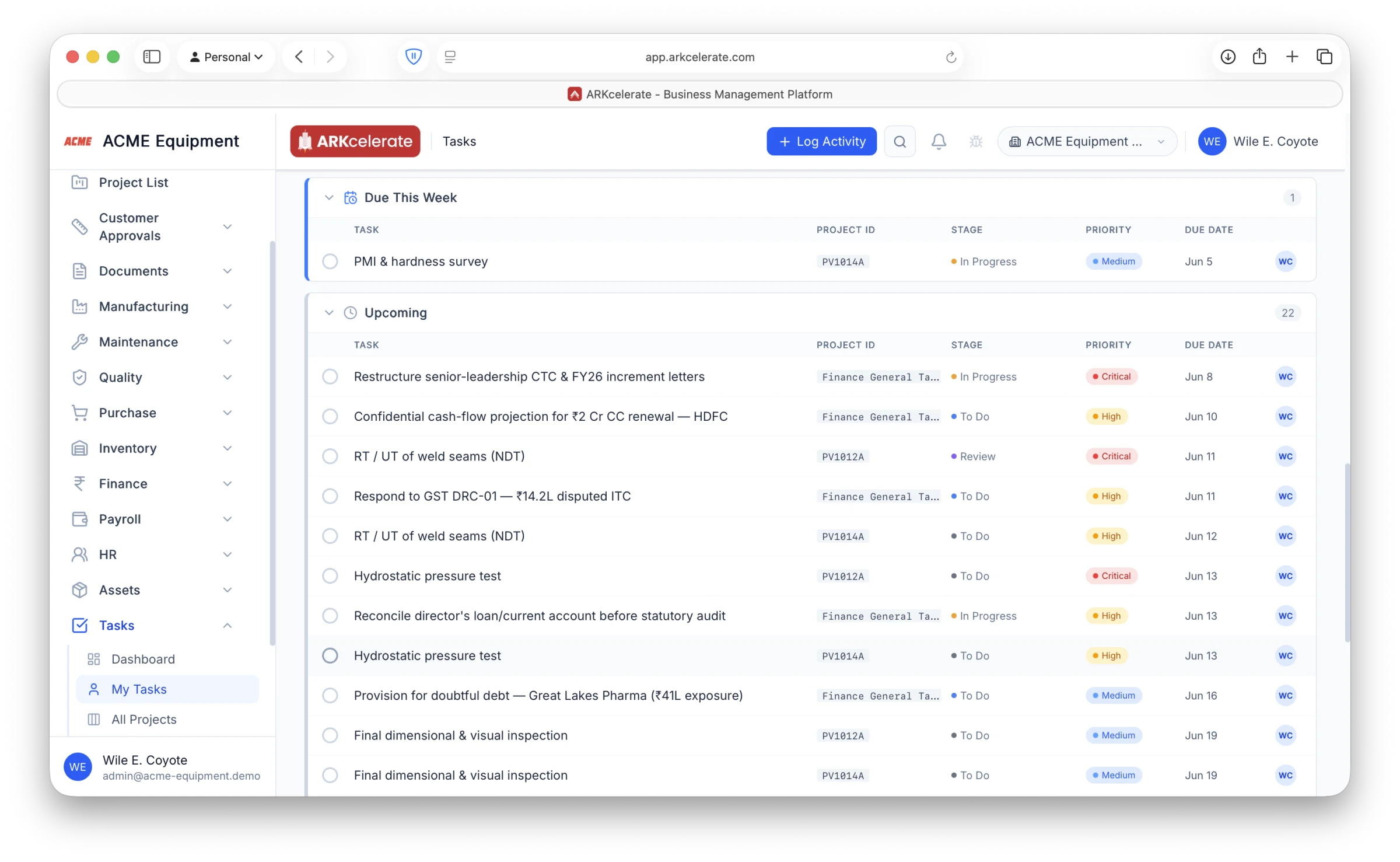
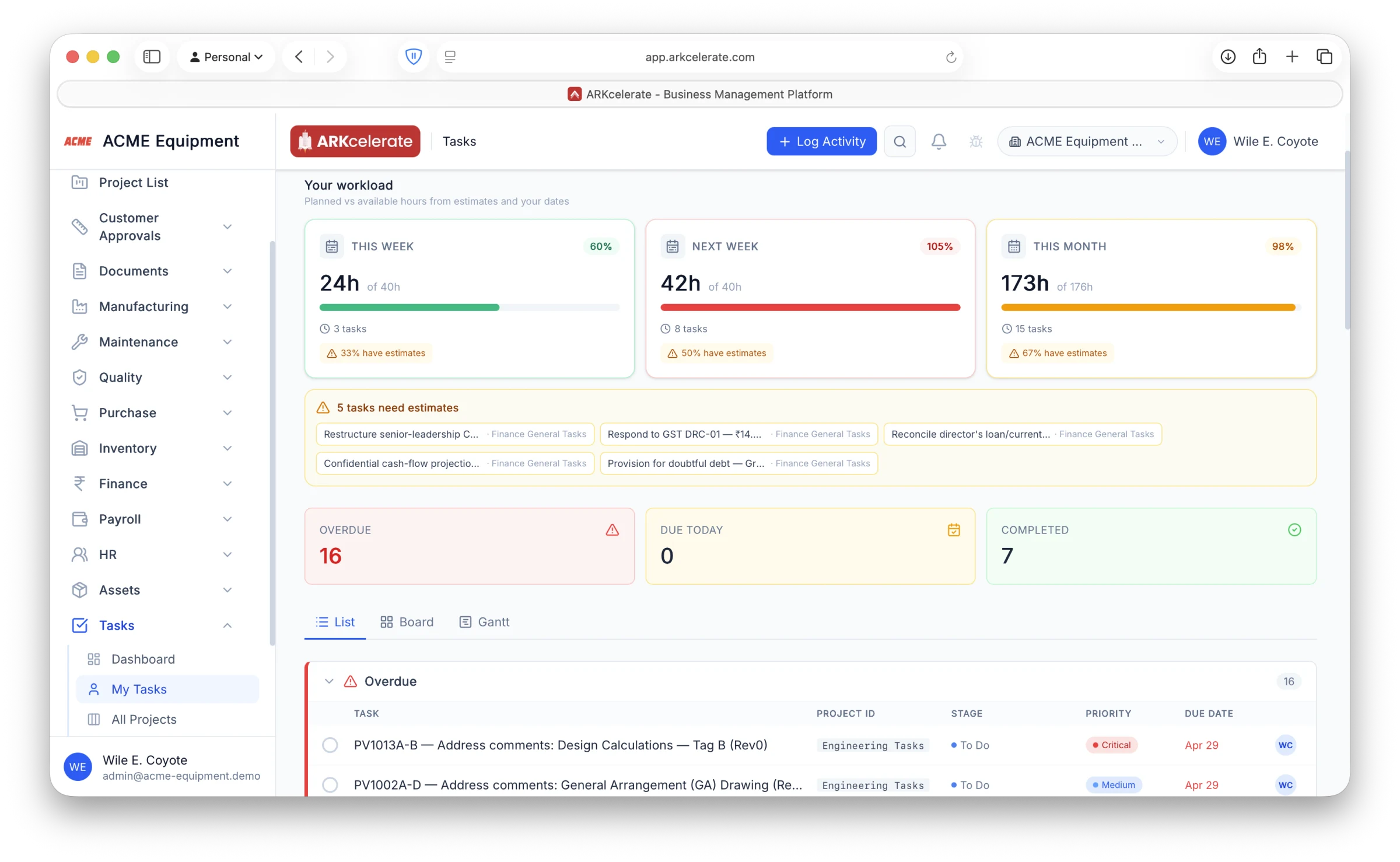
Every person opens one page and sees exactly what they own across every project — and how loaded they are. The workload cards show how many hours of work are planned this week, next week and this month against the hours they actually have, so anyone can see at a glance whether they are over-committed. Below that, their tasks are split into Overdue, Due Today and Upcoming, each row showing its project, stage, priority and due date — so everyone knows what is late, what is due now, and what is next without hunting through boards.
- Planned hours this week / next week / this month vs available hours
- Overdue, Due Today and Upcoming lists in one place
- Each row shows project, stage, priority and due date
- Flags your own tasks that are missing an estimate
- Flip the same tasks to Board or Gantt
Feature 03
Project templates with the critical path built in.
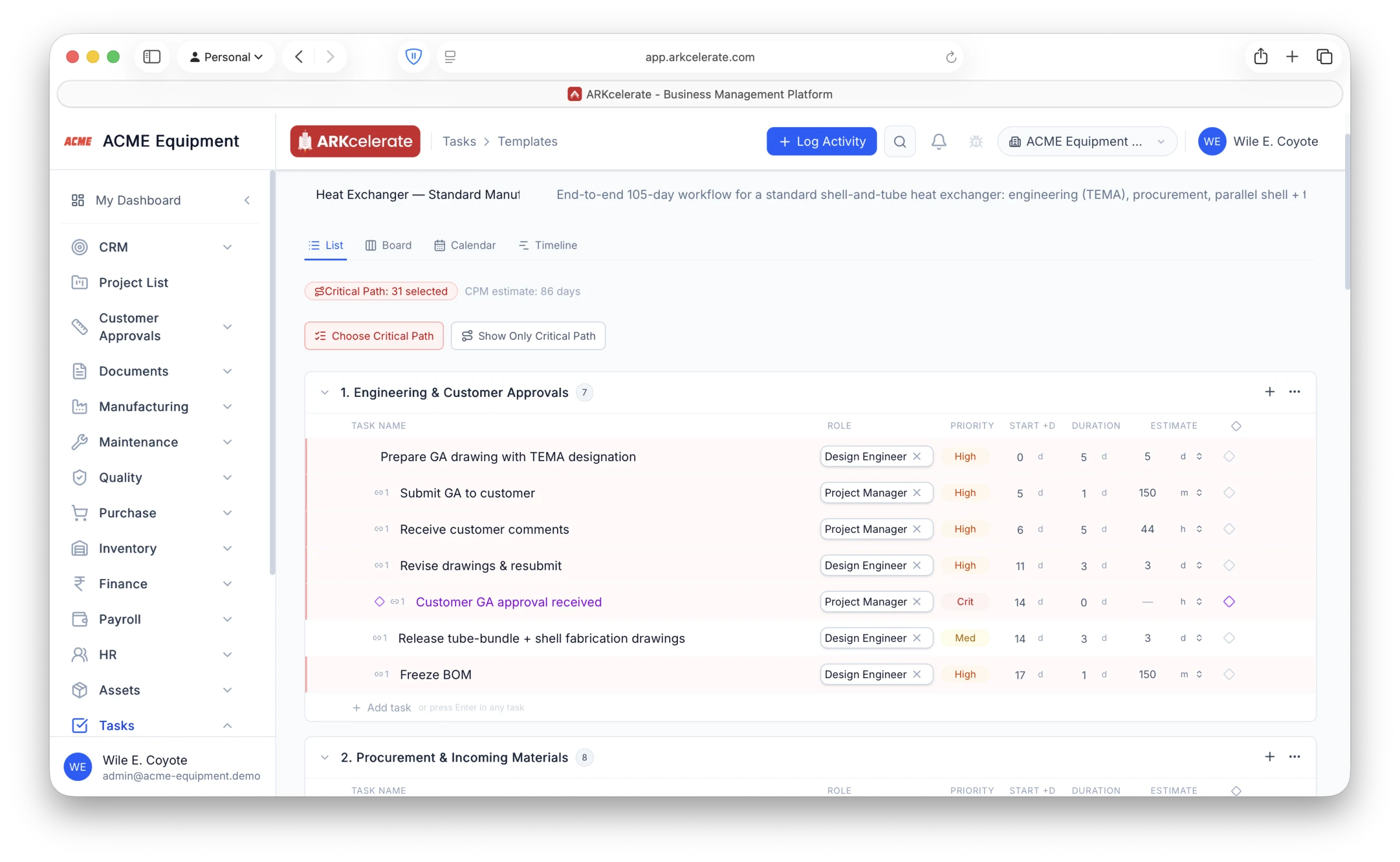
Plan a whole project once and reuse it on every job. A template breaks the work into sections and tasks, each with an effort estimate set in days, hours or minutes, linked by finish-to-start dependencies with the critical path marked — so you can see at a glance which tasks actually drive the delivery date. Every task is also pre-assigned to a role — Design, Production, Purchase, Quality or Project Manager — rather than to a named person. So when you apply the template to a new project, you map each role to a real team member just once and every task is automatically assigned to the right people. Add milestones and the plan only tightens with each project that reuses it.
- Per-task effort estimates entered in days, hours or minutes
- Critical Path Method — the tasks that set the delivery date are flagged
- FS / SS / FF / SF dependencies and milestones in the template
- Tasks pre-assigned to roles, not named people
- On apply, map each role to a person once and every task auto-assigns
Feature 04
A leaderboard so managers see who delivers — and who is slacking.
Every completed task earns points, and the leaderboard ranks the team by points, completion %, on-time % and streaks, with badges for consistency. A manager can tell at a glance who is finishing their work on time and who is falling behind — overdue counts and a recent trend sit right next to each name. Sincere, reliable people rise to the top and get the recognition they have earned, while chronic slippage is visible instead of buried in a board somewhere.
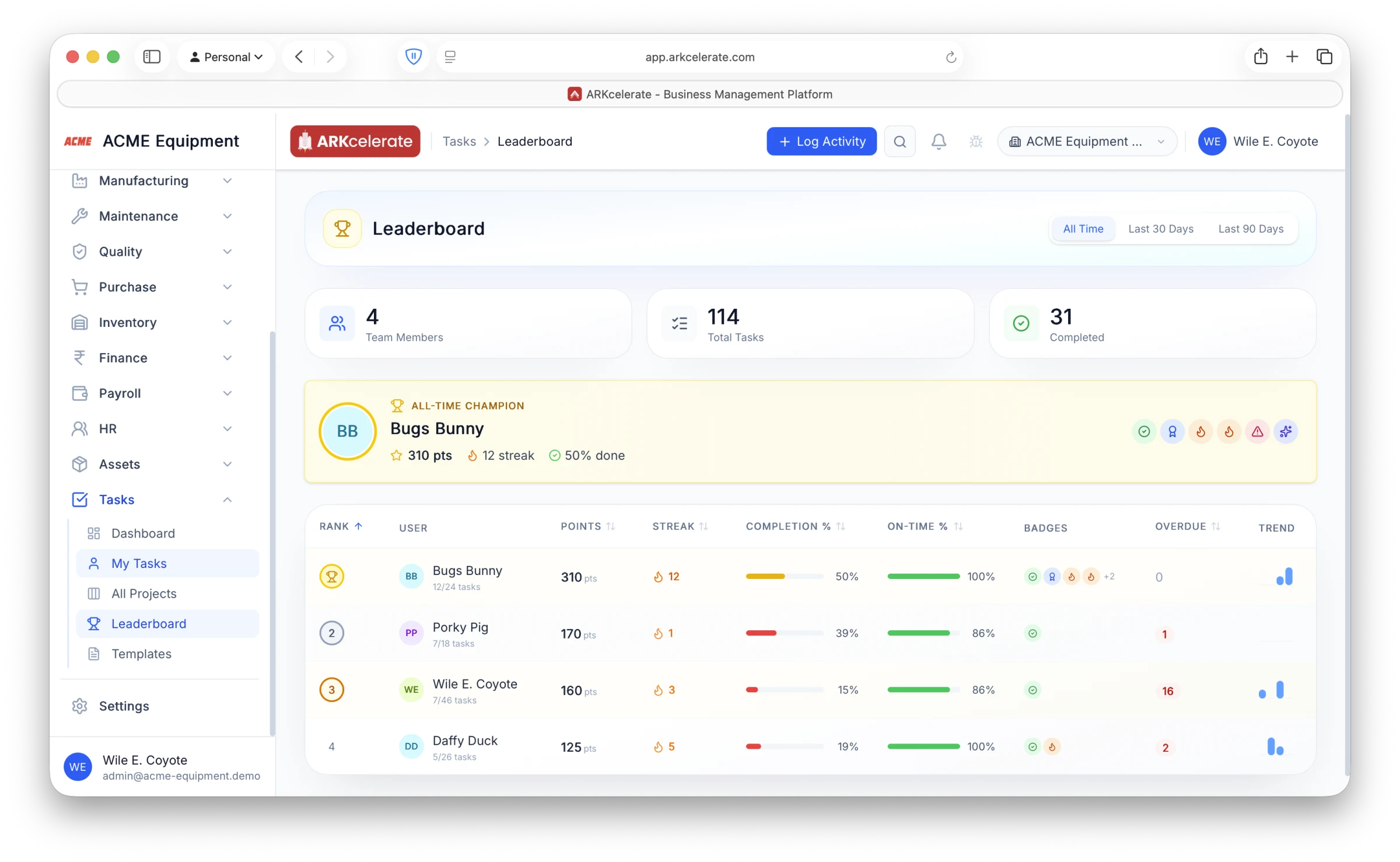
- Ranks the team by points, completion %, on-time % and streaks
- Badges reward consistency and on-time delivery
- Overdue count and a recent trend shown per person
- All-time, last 30 days or last 90 days
- Spot top performers to reward and slippage to address
The project-based manufacturing angle
Your task board is a side effect of how work actually flows.
In a project shop, the board shouldn’t be something you build from scratch every time. When a project starts, ARKcelerate creates its board automatically from a matching template — stages, sections, tasks, milestones and role-based owners — and board rules keep cards moving as the work progresses. You plan the work, not the scaffolding.
Everything in the module
The full Task Management feature list.
Grouped by functional area. Every feature below is included in every plan — no paywalled tiers, no “enterprise edition” unlocks.
| Area | Features |
|---|---|
| Views |
|
| Automation engine |
|
| Planning & scheduling |
|
| Collaboration |
|
| Templates & forms |
|
Try Task Management alongside every other module.
One signup. Full feature access during your trial.