
One Project ID the whole ERP follows.
One project list that every module reads from — a won deal becomes a project, and CRM, manufacturing, purchase, quality and finance all work off it.
What makes it unique
The features that set Project List apart from a generic ERP.
These are the workflows big ERPs either skip or get wrong.
One Project ID, thirteen modules
Every PO, MO, BOM, drawing revision, GRN, invoice, payslip and time entry carries the same Project ID by design. No copy-pasting, no spreadsheet bridge — the project is the join key everywhere.
Won deal → project
When a CRM opportunity is won, convert it into a project in one step. Promised lead time, quoted scope, customer contacts and approved drawings all carry across — manufacturing knows what to build, by when, and against which spec.
Customer Approvals tied to the project
Drawings, revisions, customer sign-offs and the audit trail all live under the project. Manufacturing Clearance Date stamps the moment the customer approves the critical doc — and the Dispatch Deadline computes itself from there.
Cost tracking — committed, actual, real-time
POs hit committed cost on approval; GRNs flip them to actual; payroll time-entries add labour cost; invoices update billed value. Open the project, see the live margin — no month-end reconciliation needed.
Auto-task board on creation
Creating a project spawns a Tasks board pre-built from a template — stages, sections, tasks and milestones — so the team has somewhere to work from day one, without setting it up by hand.
P1 priority cascades downstream
Mark a project P1 and it bumps to the top of the manufacturing queue, the purchase-approval inbox, the engineering revision board and the QC schedule — all in one flag. Priority is set once, respected everywhere.
Feature 01
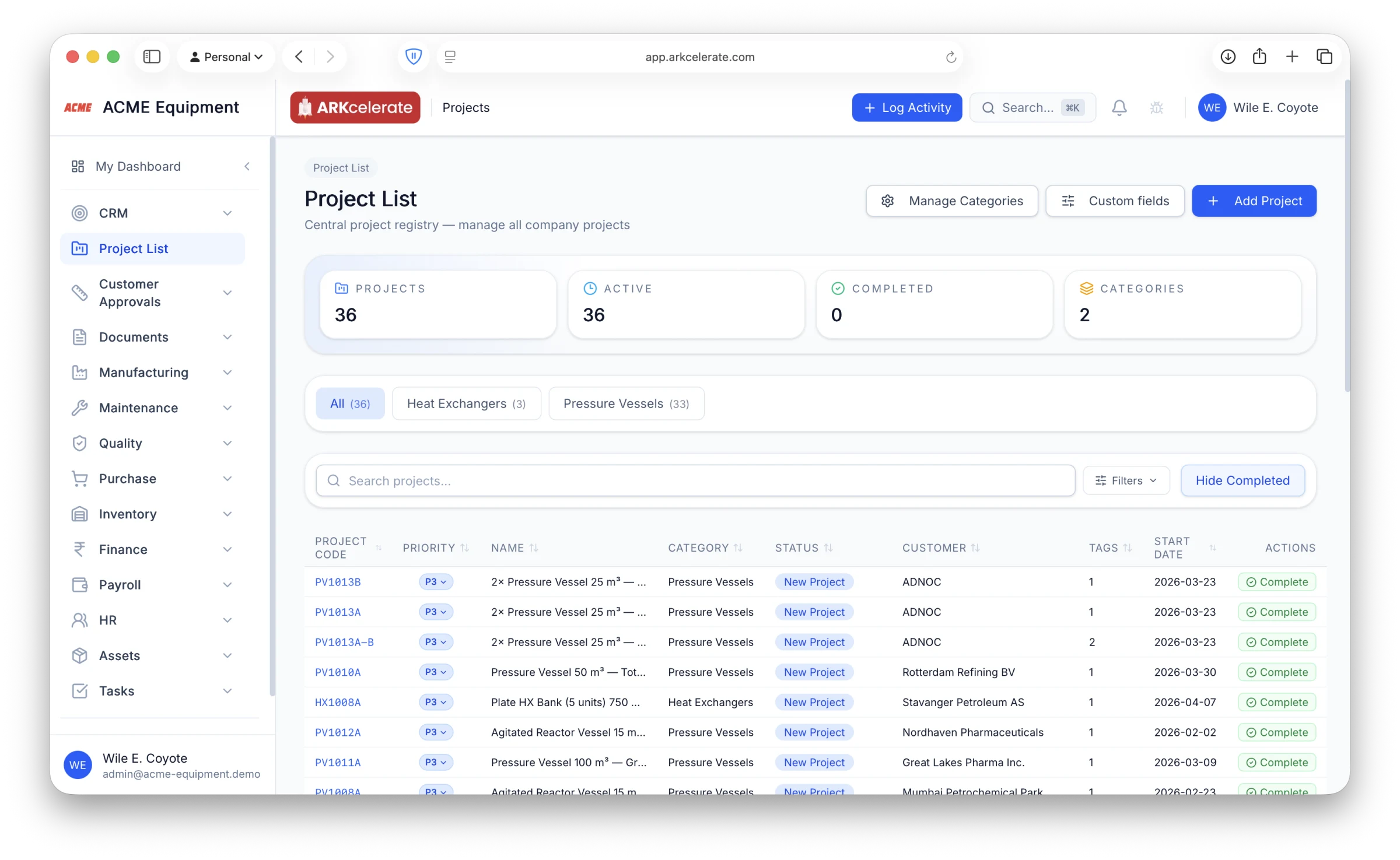
A central registry — one row per engagement, the lookup key every module uses.
The Project List is the master record for every engagement: project code, customer, stage, owner, budget, start + end dates, status, on-time indicator. Search, filter, group, bulk-edit. From this one screen you can drill into the project and reach every MO, PO, invoice, drawing and time entry that’s ever been logged against it. Nobody else needs to maintain their own copy of "the project" — the rest of the org reads from this one.
- Custom project stages per org (e.g. Awarded → Engineering → Production → Pre-Despatch → Closed)
- Multiple owners per project: PM, engineering lead, commercial lead, site lead
- Customer + project-site fields (separate from billing address)
- Budget capture with revision tracking, scope-change flags
- Filter by customer, KAM, status, priority — bulk-edit when scope shifts
- On-time indicator computed from the Dispatch Deadline, visible at a glance
Feature 02
Live production status — for every component, on every tag.
Open any project and the Manufacturing tab shows you exactly where things stand on the shop floor. Component-level progress per tag (one project, three vessels, twelve components — each at its own stage), shopfloor areas and workers assigned to this project, and an overall percent-complete that’s computed from the actual stage on each piece. No status-update meeting required — the data is the status.
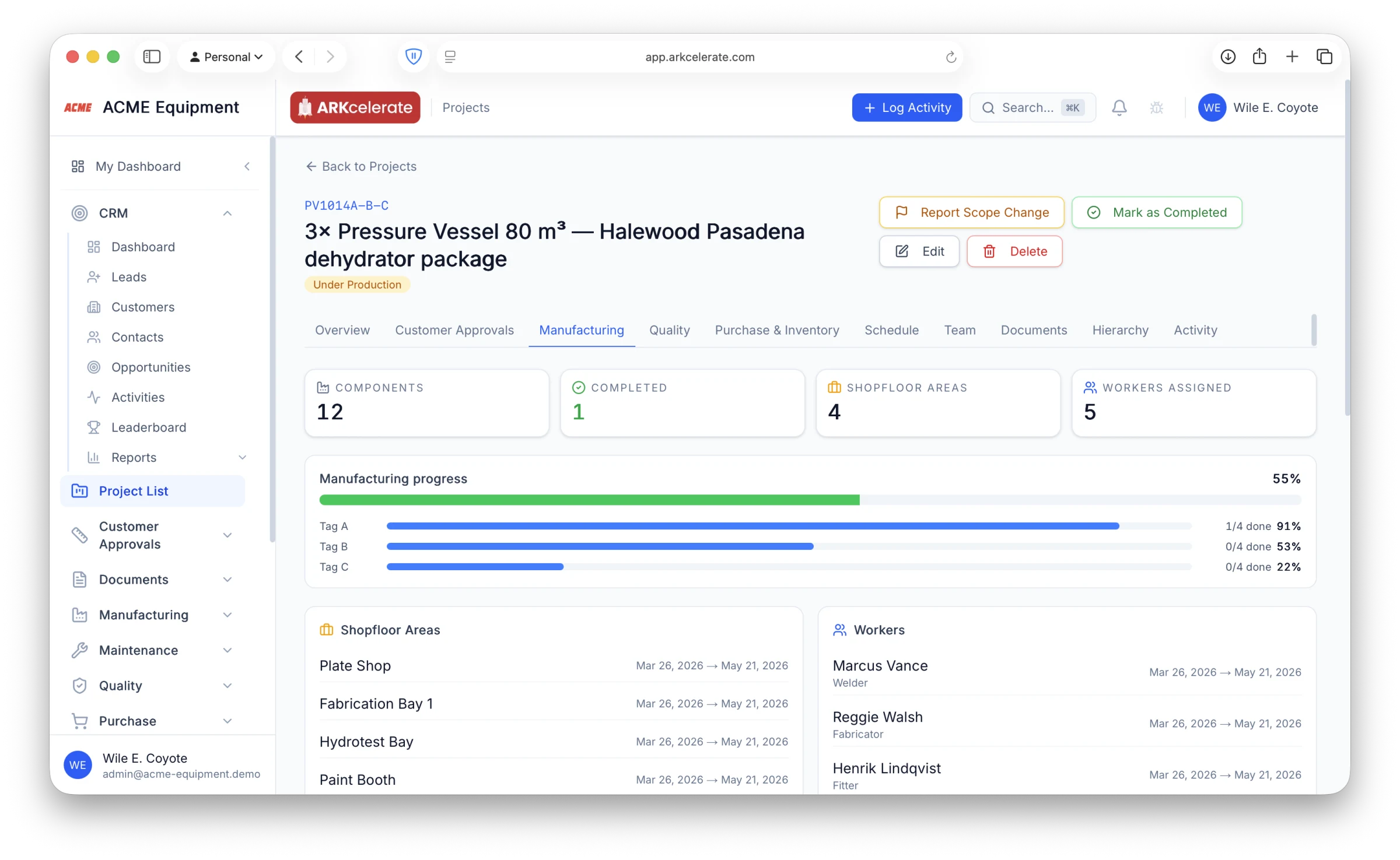
- Per-tag progress bars + a 12-row component status table, each showing its current stage of fabrication
- Shopfloor areas (Plate Shop, Fabrication Bay 1, Hydrotest Bay, Paint Booth) booked against the project for the duration of the build
- Individual workers + production teams assigned with from/until dates — capacity stays honest
- Stages defined per product type (Plate / Shell, Tube Bundle, Machined Component, Bought-Out)
- Overall percent-complete is derived, not entered — managers can’t “round up”
Feature 03
Committed spend — per PO, per line, per supplier — in real time.
Procurement happens in Purchase, but the project owner doesn’t want to live there. The Purchase & Inventory tab on the project page shows every PO raised against this project: committed spend (basic + tax + total) by currency, status of each PO (received / partial / pending), and per-line received-vs-pending counts. The numbers update the instant a PO gets approved or a GRN gets posted — same ledger, just lensed against this one project.
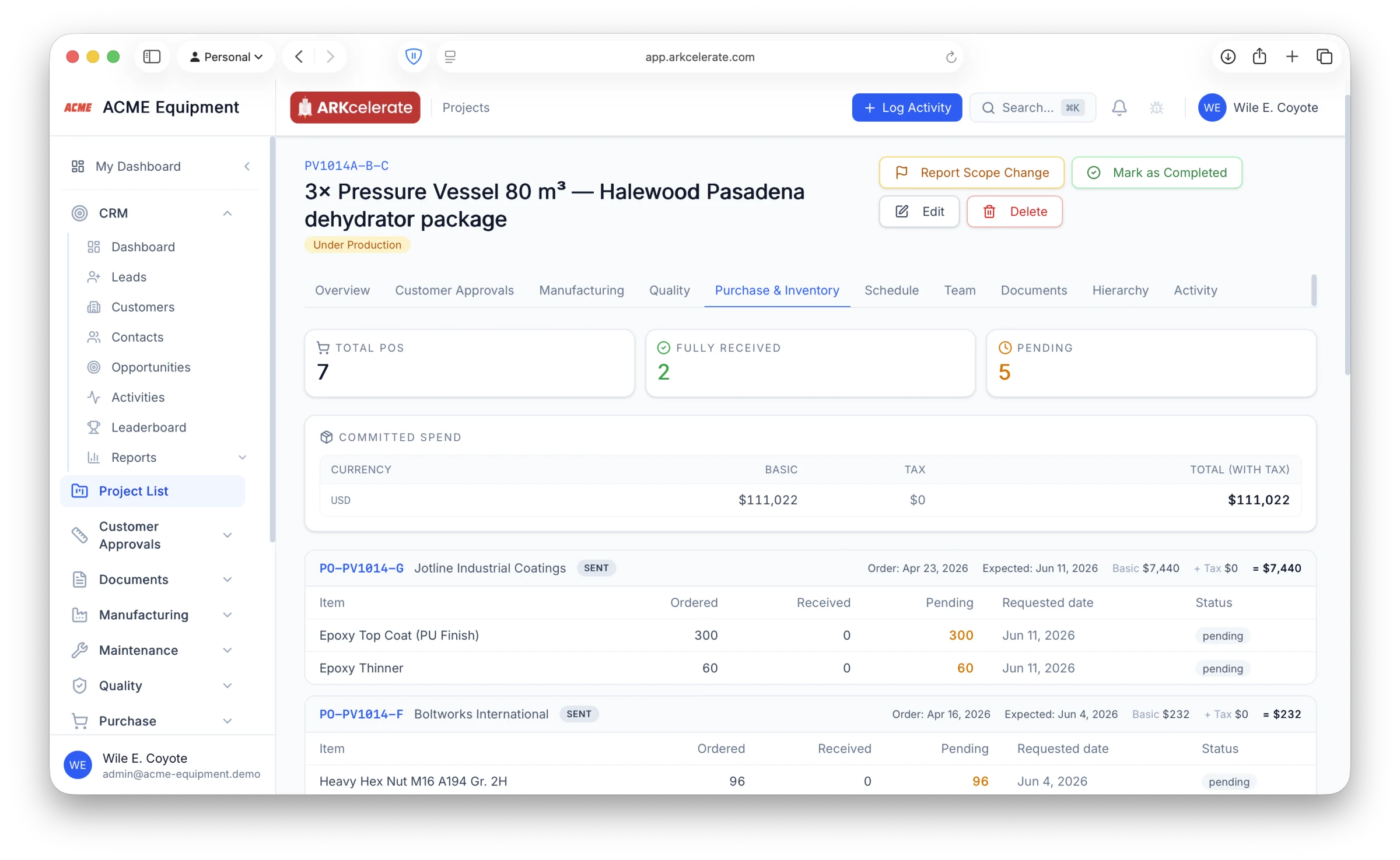
- Committed-spend table by currency — basic, tax, total — for projects that buy in USD + INR + EUR
- Per-PO summary: supplier, status, order date, expected delivery, totals
- Line-level received / pending split, so you can see *which* item is holding the build up
- Statuses (Received / Partial / Pending) refresh as soon as the GRN is posted in Purchase
- Click any PO number to jump straight into the Purchase module with full context
Feature 04
Every document the project ever touched — filed against the Project ID, forever.
The customer’s RFQ. The first GA Rev. 0 and every revision after it. MTCs from the plate mill. Weld maps. Radiography reports. ITPs. Hydrotest certificates. Internal MoMs. Weekly progress decks. As-built drawings. All of it lives in one place — the project itself — tagged with the same Project ID that Manufacturing, Purchase, Quality and Finance already use. Three years from now, when the customer calls about a leak and asks for the heat-lot certificate of the dished end, you don’t have to dig through old emails or chase someone’s laptop. Open the project, open Documents, find it.
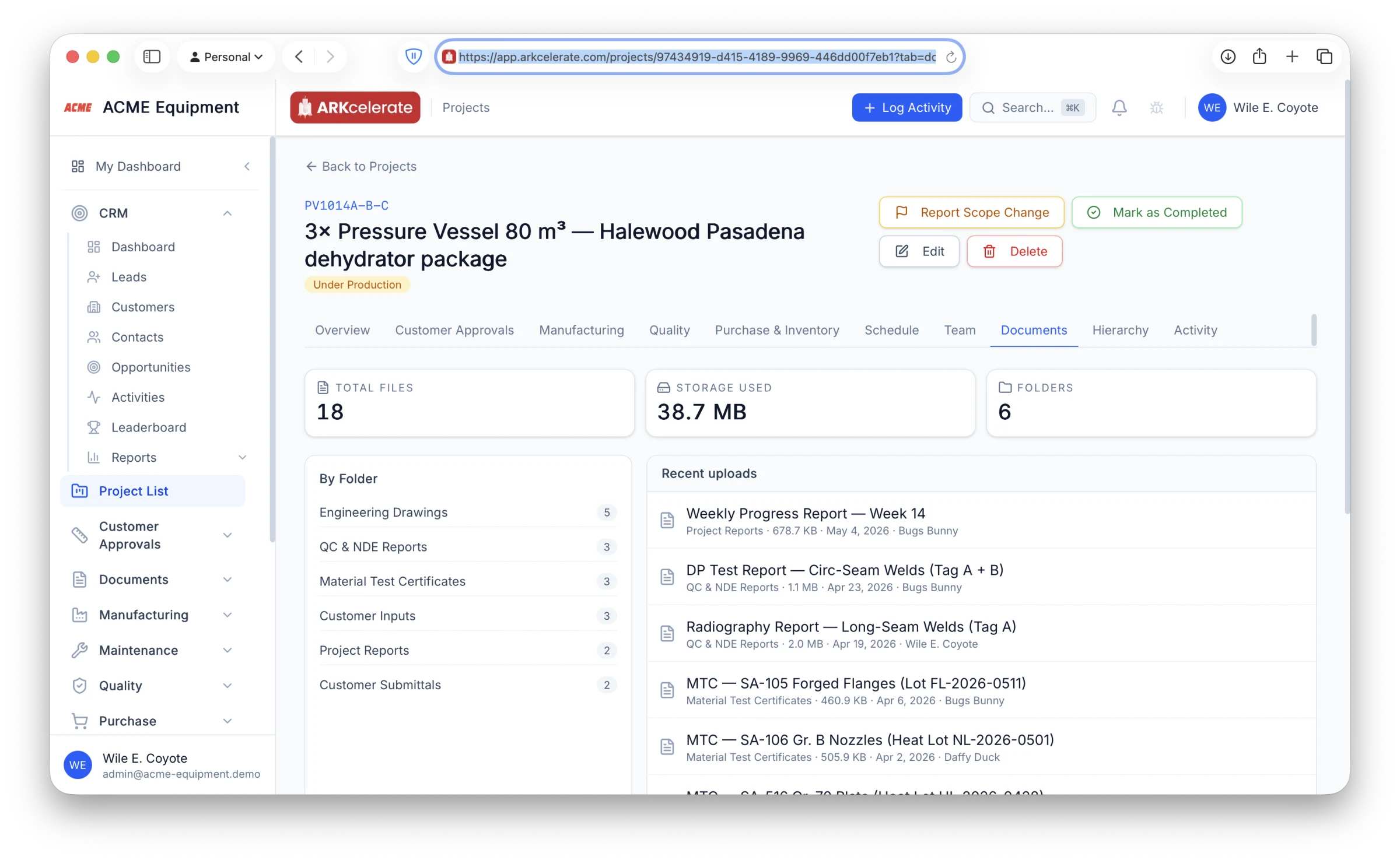
- Single Project ID is the join key — every document is queryable against it for the life of the project (and well beyond)
- Pre-organised folders: Customer Inputs · Engineering Drawings · Material Test Certificates · QC & NDE Reports · Customer Submittals · Project Reports
- Full revision history per document — every uploaded version is preserved; supersedes-chain shows the lineage at a glance
- Customer + supplier docs filed alongside your own work, so traceability is end-to-end (mill heat lot → MTC → GA → ITP → hydrotest report — all on one page)
- Recent uploads feed surfaces what just landed; folder counts show what’s still pending
- Department-based access control — Engineering sees calc files, QA sees NDE reports, Sales sees what they need, no more
The project-based manufacturing angle
One Project ID, one source of truth — across every module.
In a generic ERP, "projects" is a tag you can attach to records if someone remembers to. In ARKcelerate the Project ID is the join key the entire data model is built around — created when the deal is won, present on every PO, MO, BOM, drawing, GRN, invoice, payslip and task that follows. The result: profitability matches reality, deadlines are computed not estimated, and nobody has to keep a side spreadsheet to know what’s actually going on with project X.
Everything in the module
The full Project List feature list.
Grouped by functional area. Every feature below is included in every plan — no paywalled tiers, no “enterprise edition” unlocks.
| Area | Features |
|---|---|
| One project page, every signal in one place |
|
| Overview tab — the project at a glance |
|
| Customer Approvals tab — what the customer has seen and signed off |
|
| Manufacturing tab — live shop-floor state, per component |
|
| Quality tab — every inspection and punch point on the project |
|
| Purchase & Inventory tab — every commitment and movement, real time |
|
| Schedule tab — promised vs computed dispatch deadline |
|
| Documents tab — every file the project has ever touched |
|
| Team & Hierarchy tabs — who owns it, what sits under it |
|
| Activity tab — every event the project has ever seen, in one timeline |
|
Try Project List alongside every other module.
One signup. Full feature access during your trial.