
Live ITPs. RCA & CAPA. One Quality Dossier.
Run your QAP as a live ITP with witness points, investigate failures with RCA and CAPA, and export the whole story — inspections, verdicts, photos — as one audit-ready Quality Dossier PDF.
What makes it unique
The features that set Quality apart from a generic ERP.
These are the workflows big ERPs either skip or get wrong.
Quality dashboard mirrors the manufacturing structure
The same sections + components you build under Manufacturing surface under Quality — but with inspection checks tied to each stage and a verdict (pending → pass / fail / na / conditional) on every piece. No translation layer between the two modules.
Customisable inspection templates per product type
A QC template is a tree of sections (Plate, Welds, Hydrotest, Painting, …), each with its own check items, units, tolerances and mandatory evidence. Define once per product family; spin up a fully-populated inspection for a new project in one click.
Customer / FAT inspections are first-class
Schedule a customer-witnessed inspection (FAT, IRN visit, source inspection), invite attendees, capture observations + customer remarks, log the outcome on a single record that lives with the project. Customer signs off — handover-pack-ready.
Punch Points capture and chase open issues
Inspector finds a leaky weld on the third pressure vessel? Raise a punch point against the project, with priority, owner, target date and required action. Open punch points block dispatch; verified ones close out automatically when the next inspection passes.
CAPA / RCA — full audit-ready record with single-click PDF export
Every finding closes with structure: provenance, 5-Why + Ishikawa, disposition with approver, separate corrective and preventive actions, and a verification gate that blocks closure until preventive is checked. Export the whole project’s CAPA pack as one PDF — cover, linked index, your logo, registered legal name — and email it to the customer.
Defect categories the team actually uses
Customisable defect taxonomy (welding-related, dimensional, paint-finish, fastener-torque, …) so when a CAPA closes, the data feeds into a Pareto chart that tells you where to invest in training, jigs or supplier audits.
Hold-point gate — quality can stop the shop floor, not just alert it
Flip one setting and a component with open critical punch points or failed required checks cannot advance to its next manufacturing stage. The floor sees exactly which items block the move; only a quality senior can override — with a written reason that lands in the audit trail alongside the stages and the open items.
Executable ITP — your issued QAP becomes a living checklist
Issue a project QAP and generate an ITP execution from it: one line per plan row, witness points flagged straight from the W column, progress tracked as inspections complete. Start a formal inspection from a line, waive a line with a concession reason (senior-only, recorded), and watch the plan complete itself — the QAP is no longer just a PDF the customer filed away.
Dispatch clearance with an evidence package
Before anything ships, production requests clearance against a live checklist — no open critical punches, no components on hold, ITP complete, no open NDE rejects. Quality approves or rejects; approving past a failing hard item takes a quality-manager override with a reason. One click generates the clearance evidence pack as a PDF: checklist, punch summary, ITP progress, inspections, open CAPAs.
Welding & NDE register
WPS library, welder qualifications with expiry tracking, NDE procedures and per-project weld joints with test results. A weld can’t be recorded against an obsolete WPS or an expired welder qual; an NDE rejection automatically raises a punch point flagged for CAPA investigation, and the weld & NDE log exports as a PDF for the customer dossier.
Field mode — QC on a phone in the yard
A phone-first inspection surface: pick the project, tap a component, run its checks with big Pass / Fail / N-A targets. A failed check raises a punch on the spot — due-date presets, needs-CAPA toggle, photo straight from the camera — without ever opening the desktop CAPA screens.
Feature 01
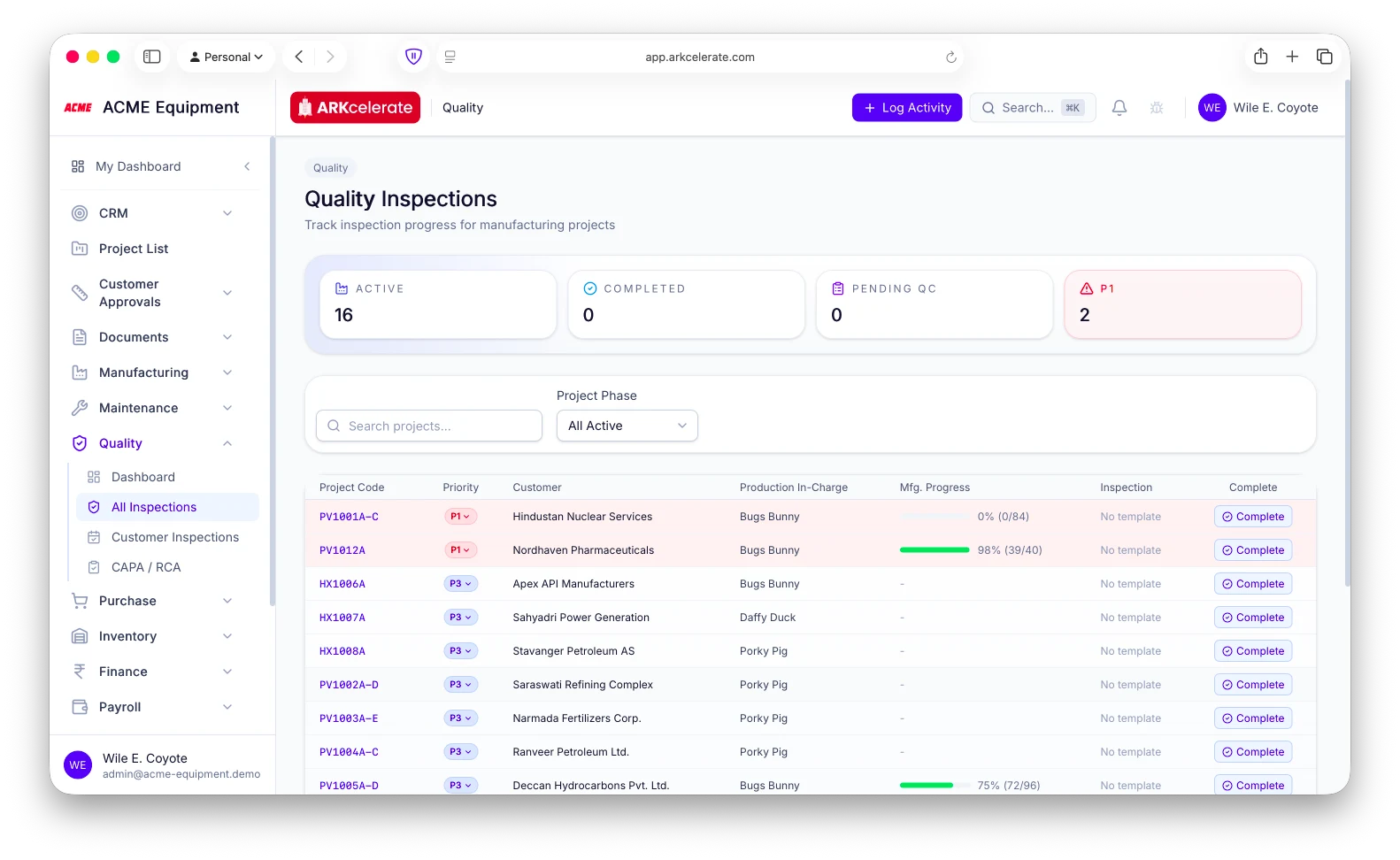
Quality Inspections — the QC inspector’s home page, in lockstep with the shop floor.
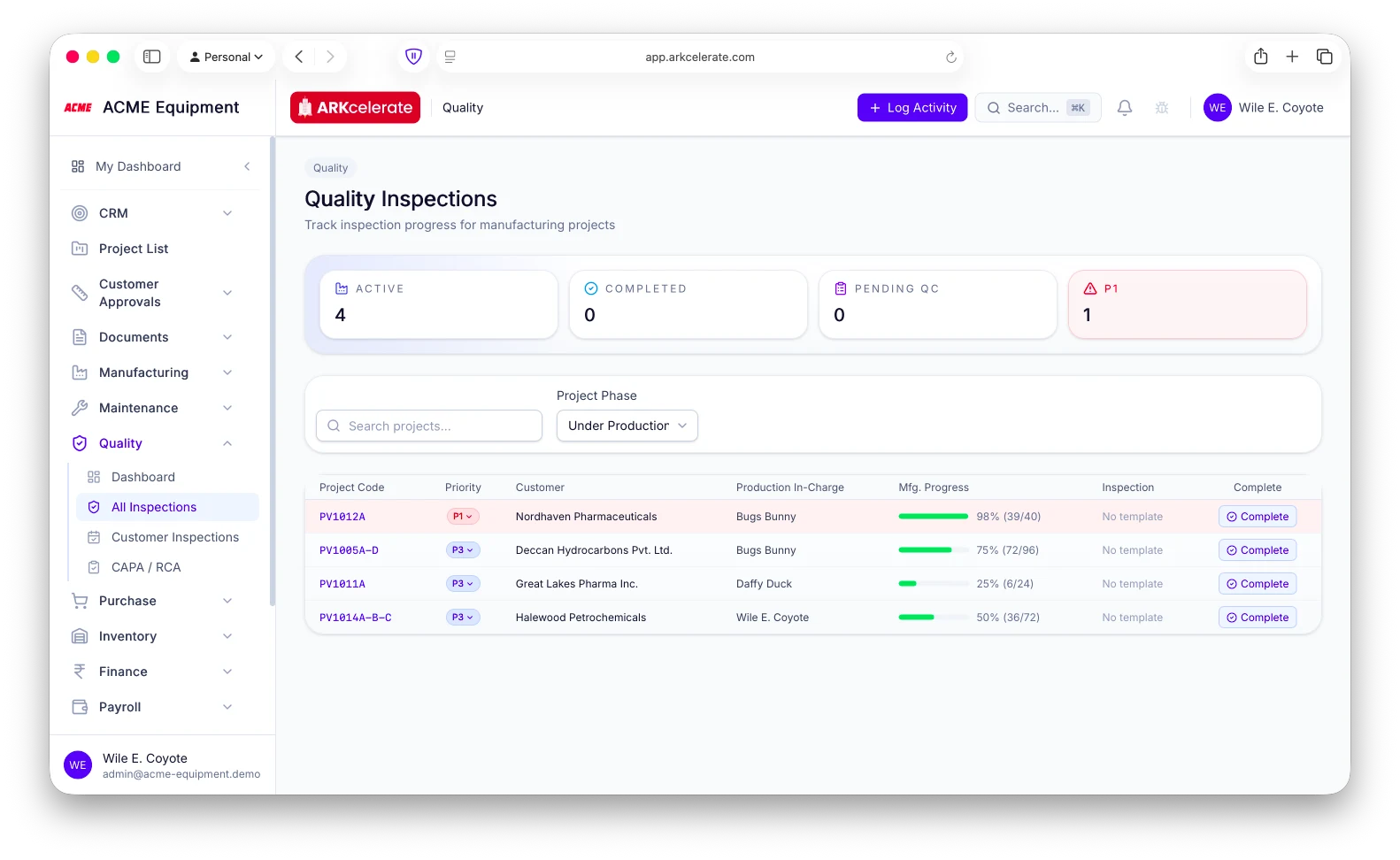
A QC inspector’s real question every morning is the same: which projects are progressing, and which components are ready for me to inspect? The Quality Inspections page answers it live. Every active project gets a row with its priority pill (P1 in red), customer, production in-charge, and a manufacturing-progress bar that ticks up as components move through their stages on the floor. Inspectors only see components that have been **marked Ready in Manufacturing** — no premature inspections of work-in-progress, no chasing the supervisor for status. KPI strip at the top: Active builds, Completed projects, Pending QC count, P1 escalations. Filter by project phase, search by project code or customer, and click into any row to see the section-by-section component list with its Ready-for-QC queue.
- Live manufacturing progress per project — green-fill bar derived from real component-stage data, not a slider
- Components surface in the inspector’s queue ONLY when the floor flags them “Ready” — no premature inspections
- KPI strip at the top: Active / Completed / Pending QC / P1 escalations
- Default filter: Under Production — the inspector’s focus stays on what’s actually being built
- P1 rows tinted red so escalations stand out even on a long list
- Click a row to drill into the Quality dashboard for that project — sections, components, per-check verdicts
Feature 02
Only the components the floor has marked Ready — so the inspector knows exactly what today’s work is.
Click into a project under Quality and the page only shows the components the shop floor has flagged Ready for QC — not the entire BOM, not every piece in production. Sections inherit straight from the manufacturing project (Shell & Heads, Nozzles & Manways, Internals, …), but inside each section only the pieces ready for inspection appear as tiles, each annotated with its checks-remaining count (e.g. “0 / 7 checked”). The inspector opens the page and sees today’s work — no hunting through a 96-component master list, no stale items that aren’t inspectable yet, no chasing the supervisor for status. Click any tile to record measurements and verdicts; tiles fill green as they pass; the section header counts up to N/N complete.
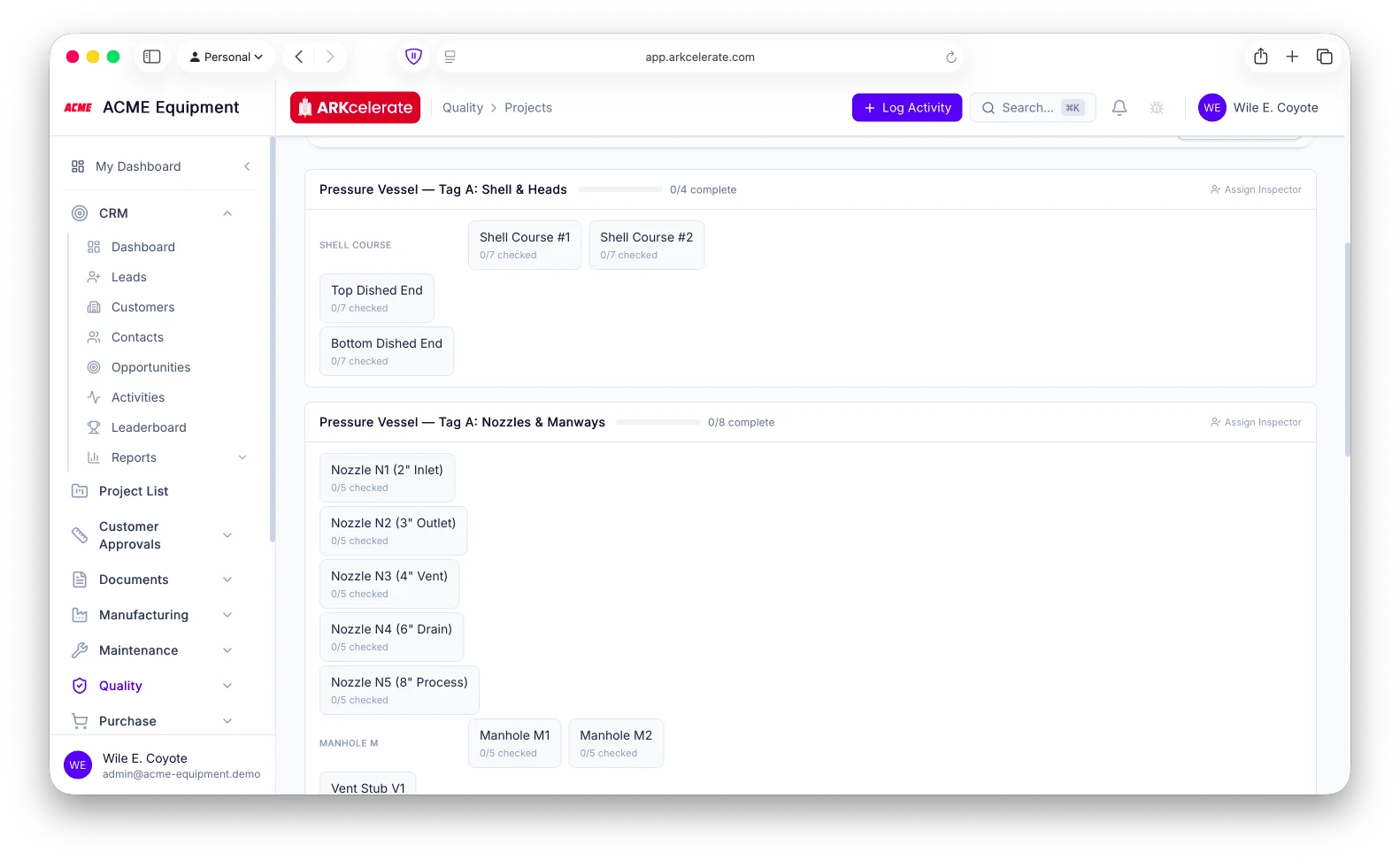
- Components surface in the QC queue ONLY when the manufacturing stage is marked Ready — no premature inspections
- Section headers show “N/M complete” so the inspector can pace through the day
- Per-tile counter (“0 / 7 checked”) makes it obvious which pieces still need work
- Tiles fill green as checks pass — the daily progress is visible without leaving the page
- Assign Inspector per section so the right pair of eyes sees their queue, not someone else’s
- Same section / component layout the floor sees in Manufacturing — no translation, no double data-entry
Feature 03
Per-component inspection templates — multi-stage, mixed check types, auto-assigned to every project.
Define an inspection template once per component type (Pressure-Vessel Nozzle, Shell Course, Dished End, Tube Bundle, …) and every component of that type on every project picks it up automatically. Each template can carry as many stages as the work demands — Visual weld inspection, Hardness survey, DP / RT / UT, Hydrotest witness sign-off, Dimensional, Final paint DFT, Surface finish, you name it — with the right check type per stage (Pass / Fail, Measurement with units + tolerances + acceptance criteria, Visual observation). When the inspector clicks a component, the popup shows that component’s full inspection sheet: every stage, the verdict pills (Pending / Pass / Fail / N/A / Conditional), the measured-value field where required, and an inline failure-capture box that appears the instant they pick “Fail”.
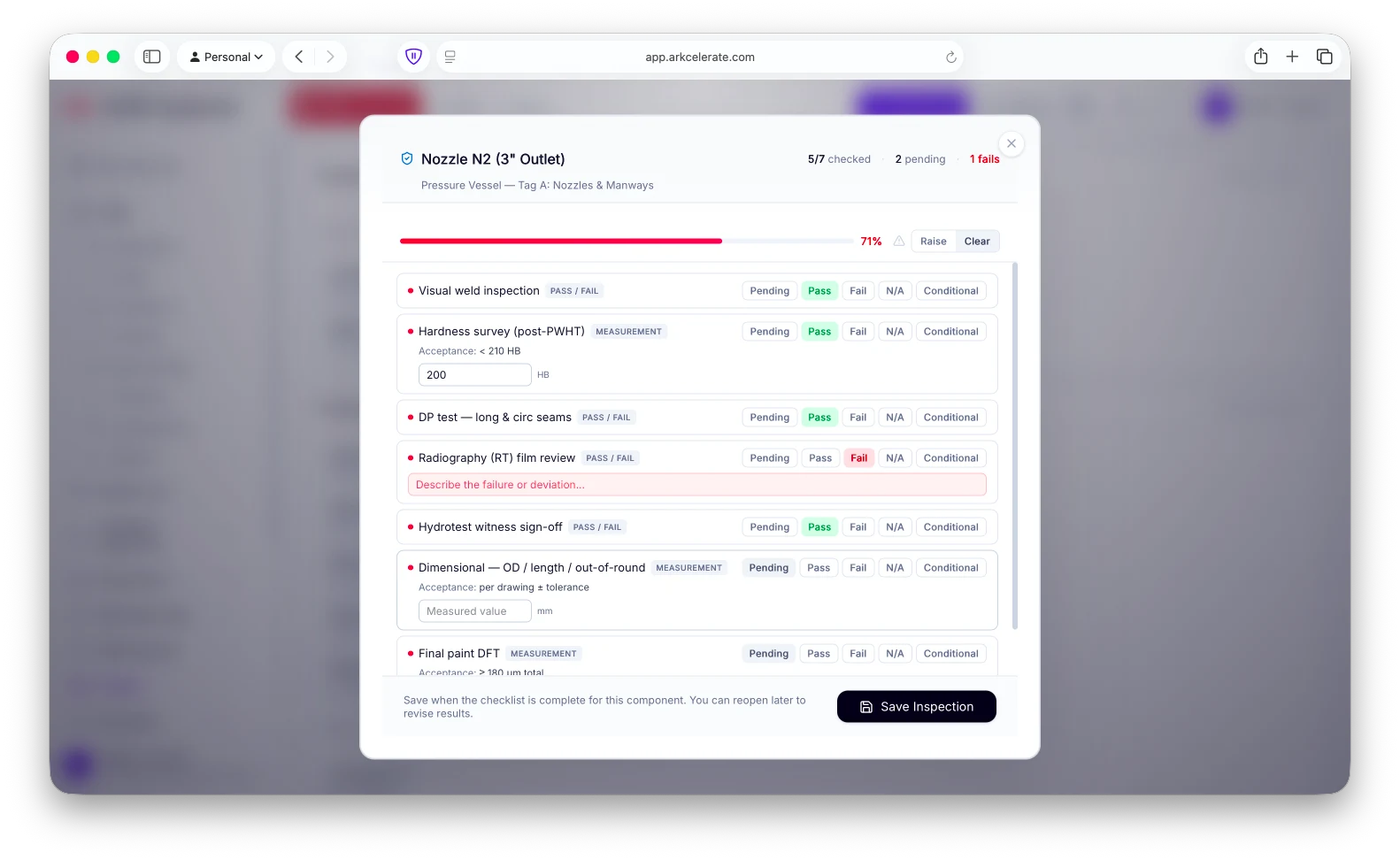
- One template per component type — assign once, applies to every component of that type across every project
- Multi-stage inspections — 6, 7, 12+ stages on a single component, each with its own check type
- Mixed check types: Pass / Fail, Measurement (with units + acceptance criteria like “< 210 HB” or “per drawing ± tolerance”), Visual / observation textarea
- Five verdict options per stage: Pending / Pass / Fail / N/A / Conditional — covers the real-world cases QC inspectors actually see
- Required-marker (red dot) on mandatory checks — and the section progress bar refuses to hit 100% until they’re cleared
- Inline failure-capture: pick “Fail” on a Pass/Fail stage and a quick “describe the failure” input drops in below the row
- Live progress strip at the top: X / Y checked, N pending, N fails — turns red the moment any stage fails
- “Raise” / “Clear” alert toggle per component to flag for escalation, hold or rework
- Save and resume — close the dialog mid-checklist, reopen later, your in-progress entries are still there
- Project subtitle on the dialog header (e.g. “Pressure Vessel — Tag A: Nozzles & Manways”) so the inspector always knows what they’re inspecting
- Custom data tables on the template (weld-pass log, NDE radiograph register, paint-DFT readings) when a stage needs structured row-level capture, not just a single value
Feature 04
CAPA / RCA — every quality finding closed, audit-ready, exportable as a single PDF for the customer.
Every CAPA carries the structure auditors expect — provenance, structured 5-Why + Ishikawa, disposition with approver, separate corrective and preventive actions, cost & schedule impact, and a verification gate that blocks closure until the preventive measure is checked. One click exports the whole project’s CAPA pack as a single PDF — cover page, linked index, tabular per-record pages, your logo and registered company name on every page — ready to email to the customer or hand to the auditor.
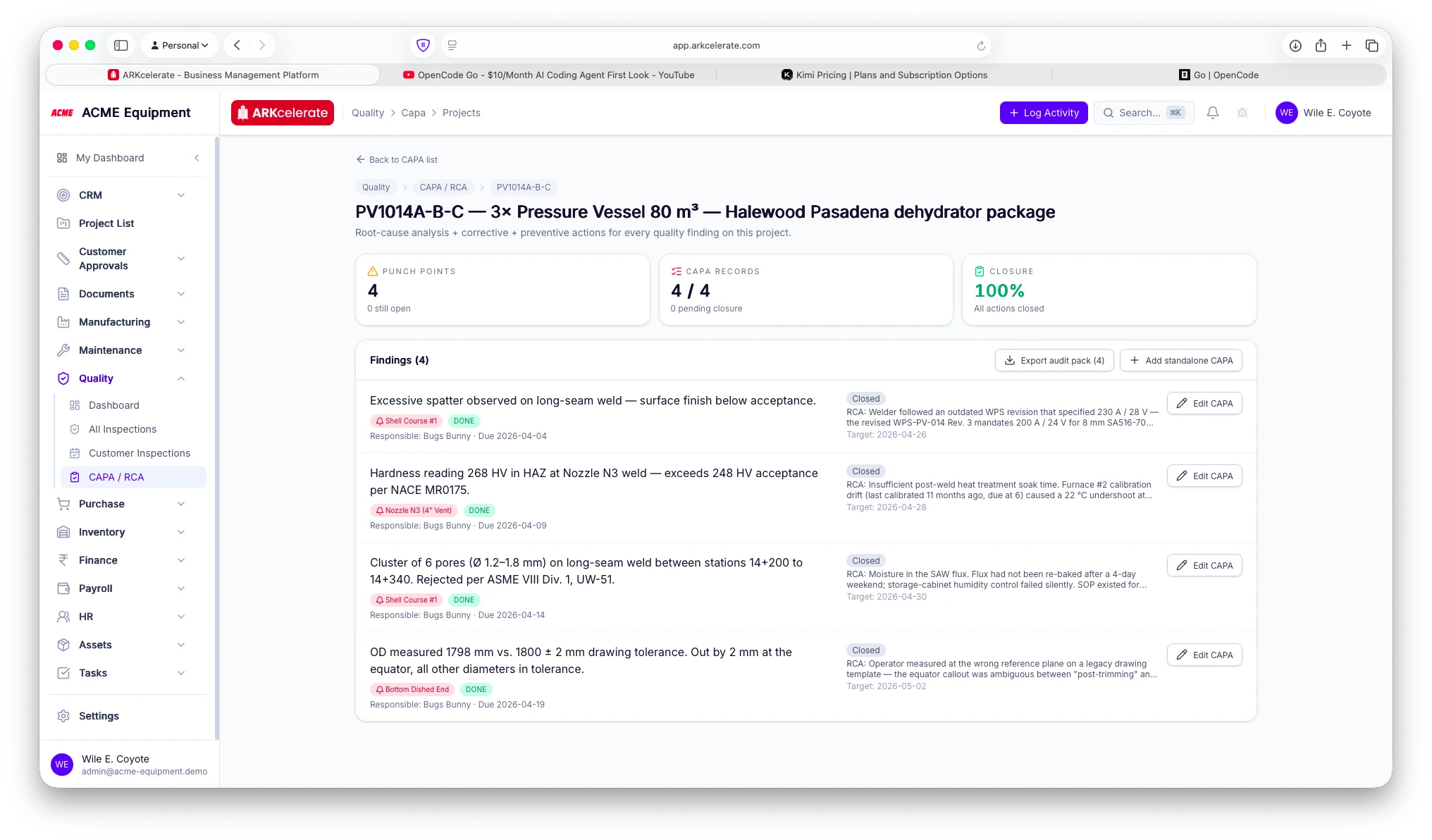
- Project-level closure tracker — Punch points, CAPA records, Closure % at the top of every project page
- Provenance captured at open: severity (minor / major / critical), detection stage (incoming / in-process / final / FAT / in-service), defect category + free-text subcategory, detected-by user, observed date, photo evidence
- Linked to component, inspection, punch point, project — every CAPA carries its origin so the audit trail is intact years later
- Structured 5-Why — five distinct levels, not one freeform field, so the analysis is readable, not a paragraph
- Ishikawa 6M multi-select — manpower / method / machine / material / measurement / environment — drives the categorisation chart on the dashboard
- Disposition workflow — use-as-is / rework / repair / reject / deviation, with disposition approver, customer concession reference, repair procedure reference, and link to the verifying re-inspection
- Cost & schedule impact captured per record — rework hours, scrap cost, schedule slip days, customer impact amount — rolled up in the analytics tab
- Preventive action structured separately from corrective — its own action type (process_change / training / design_change / tool_jig / supplier_side / sop_update / document_revision), its own owner, its own due date, its own effectiveness criteria, and a verification gate with outcome (effective / not_effective / pending) — a CAPA can’t close until preventive is verified
- Verification gate — re-inspection link, verifier sign-off, verified-at + closed-at timestamps for tamper-evident closure
- PDF audit pack export — single record OR every CAPA on the project bundled into one PDF: cover page with project + customer + severity mix + closure %, linked index, full RCA + corrective + preventive + verification per record, tenant logo + registered legal name on every page
- Email-ready, customer-ready — the same PDF an auditor would accept is the one you send the customer at handover
- CAPA analytics dashboard — Pareto by defect category, severity distribution, disposition breakdown, detection-stage analysis, Ishikawa-category breakdown, preventive-action effectiveness, cost impact rollup
The project-based manufacturing angle
The QC record is the handover pack.
In project-based manufacturing, the customer doesn’t take delivery without a QC bundle — inspection reports, NDE results, weld log, hydrotest certificate, paint DFT, customer-witnessed sign-off, punch-point closure proof. It captures all of those in structured data the moment they happen — and the dispatch-clearance workflow rolls them into an evidence package you approve, stamp and hand over without a week of stitching PDFs.
Everything in the module
The full Quality feature list.
Grouped by functional area. Every feature below is included in every plan — no paywalled tiers, no “enterprise edition” unlocks.
| Area | Features |
|---|---|
| Quality dashboard, per project |
|
| Inspection templates |
|
| Inspections |
|
| Customer inspections + Punch Points |
|
| CAPA / RCA + defect taxonomy |
|
| Hold-point gate + dispatch clearance |
|
| Executable ITP (from the QAP) |
|
| Welding & NDE register |
|
| Field mode (mobile QC) |
|
| Dashboards + analytics |
|
Try Quality alongside every other module.
One signup. Full feature access during your trial.