
Win a deal, spin up the project in one click.
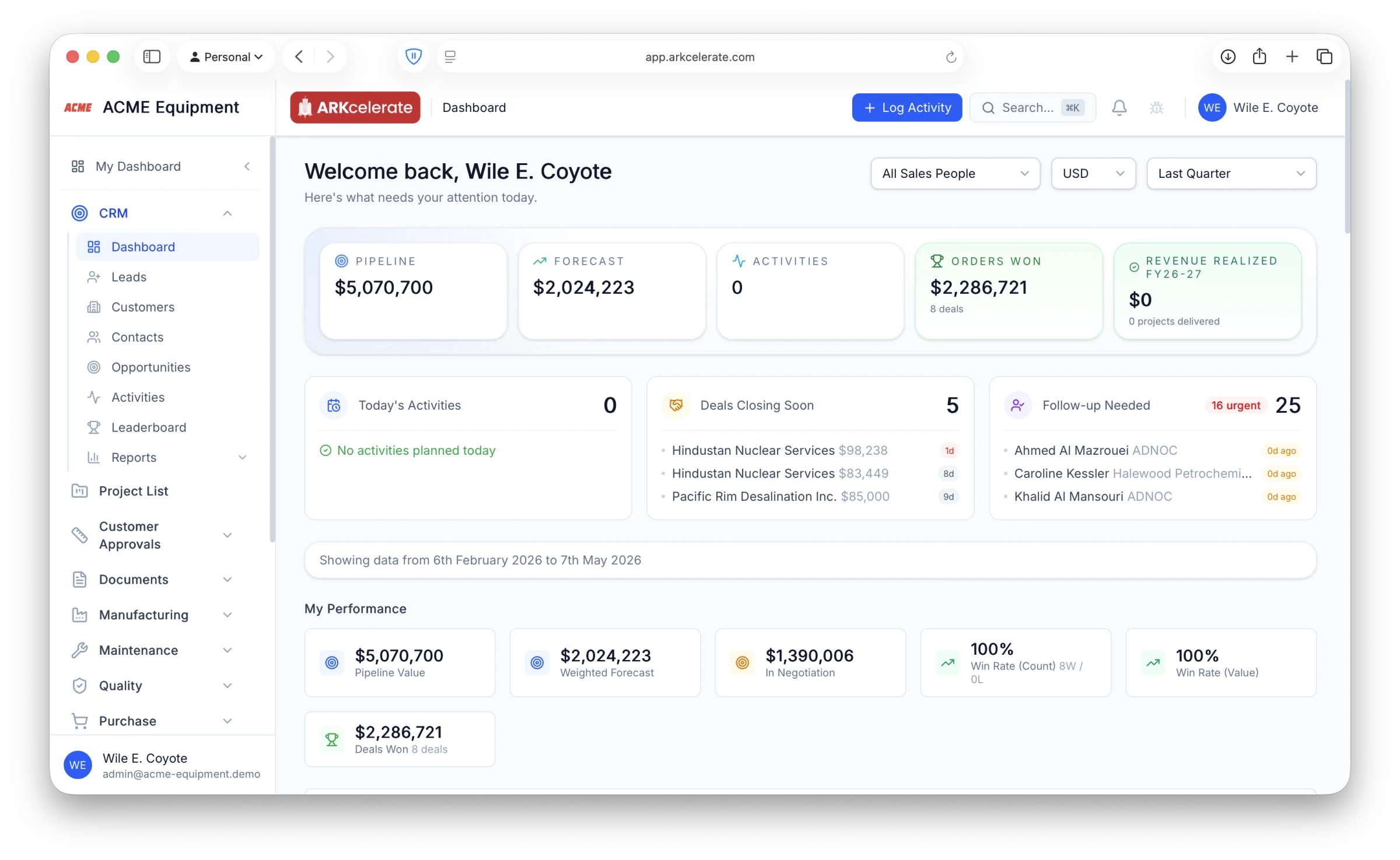
Track every lead, contact, company and deal in one CRM — then turn a won deal into a live project the whole company works from, in one step.
What makes it unique
The features that set CRM apart from a generic ERP.
These are the workflows big ERPs either skip or get wrong.
KAM ownership inheritance
Assign one Key Account Manager to a customer company; every contact, opportunity, and project under it inherits the ownership. No spreadsheets, no cross-team contact battles.
Per-contact relationship stages
Track each stakeholder individually — non-awareness → awareness → engagement → trust → advocate. A champion in engineering doesn’t help if purchase has never heard of you.
Stakeholder roles, not job titles
Tag every contact as decision-maker, influencer, champion, end-user, blocker or gatekeeper — so the deal map matches reality, not the LinkedIn titles.
Won deal → linked project
When you convert a won deal into its project, every commitment — promised lead time, scope, drawings, customer contacts, commercial terms — carries across without re-entry.
Stale-contact follow-up engine
A daily list of customers who haven’t heard from you in N days. Per-contact snooze, per-contact opt-out, per-org cadence. Customers actually remember you when the next project lands.
Customer/supplier duality
A company can be both. The same record carries credit terms, payment history, and supplier ratings — useful when your customer is also a vendor for sub-assemblies.
Feature 01
Track the relationship with every person at your customer, not just the buyer.
Engineering, purchase, quality, finance — every stakeholder at the customer has their own relationship stage and their own role in the deal. ARKcelerate tracks how well you know each person individually, so you can see at a glance whose trust you’ve earned and whose you haven’t. A champion in engineering won’t help if the purchase lead has never heard of you.
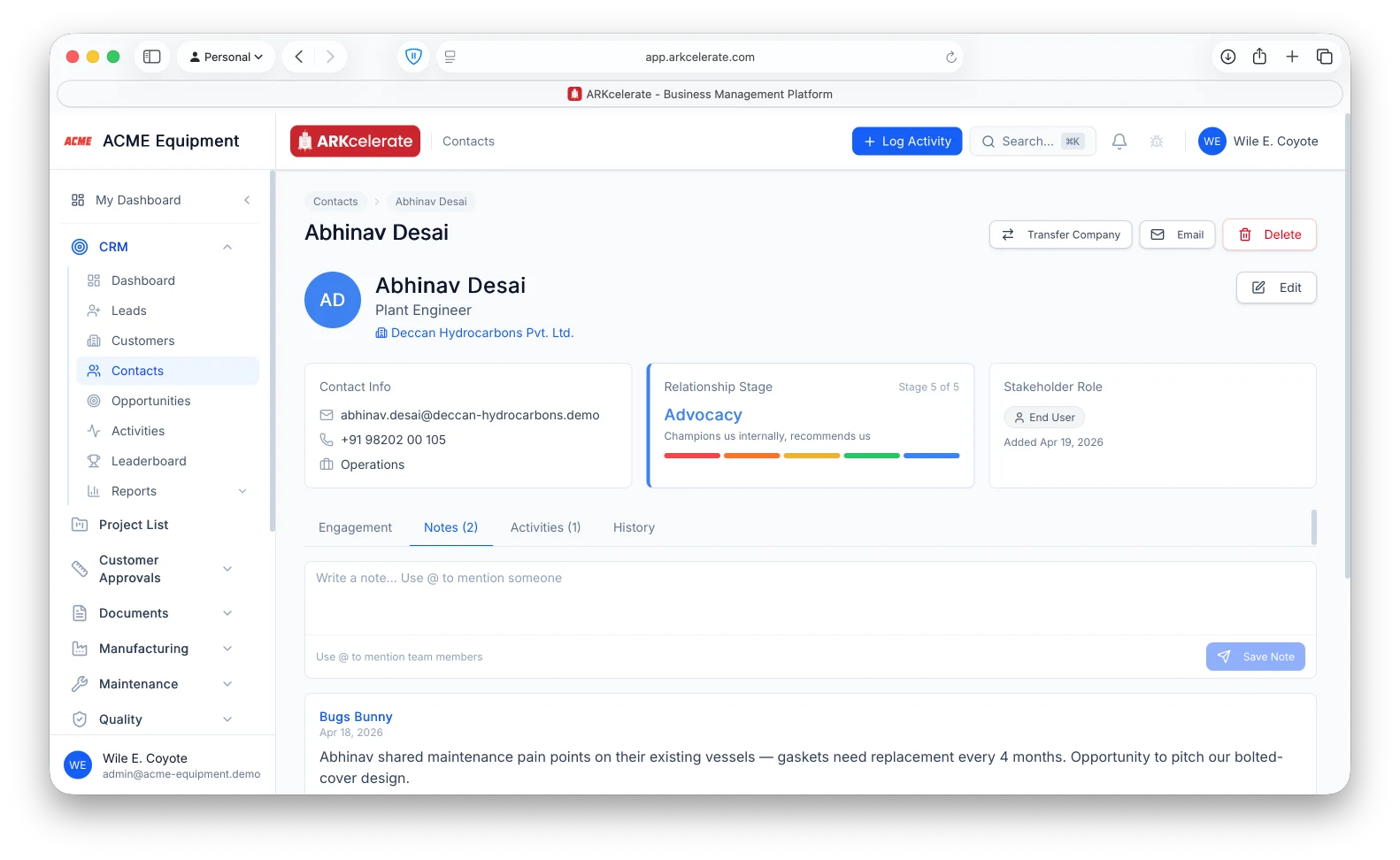
- Per-contact relationship stage (non-awareness → awareness → engagement → trust → advocate)
- Per-contact stakeholder role (decision maker, influencer, champion, end user, blocker, gatekeeper)
- Stage progression audit trail — who moved whom, when, why
- Engagement log per person: calls, emails, meetings, site visits
Feature 02
A Kanban board that tells you where every deal stands.
Opportunities live on a visual pipeline. Drag a card between stages to update status — win probability, forecast value and expected close date all recalculate in the same motion. Per-column totals keep the forecast honest. Filter by KAM, customer, or value to see only the deals you care about.
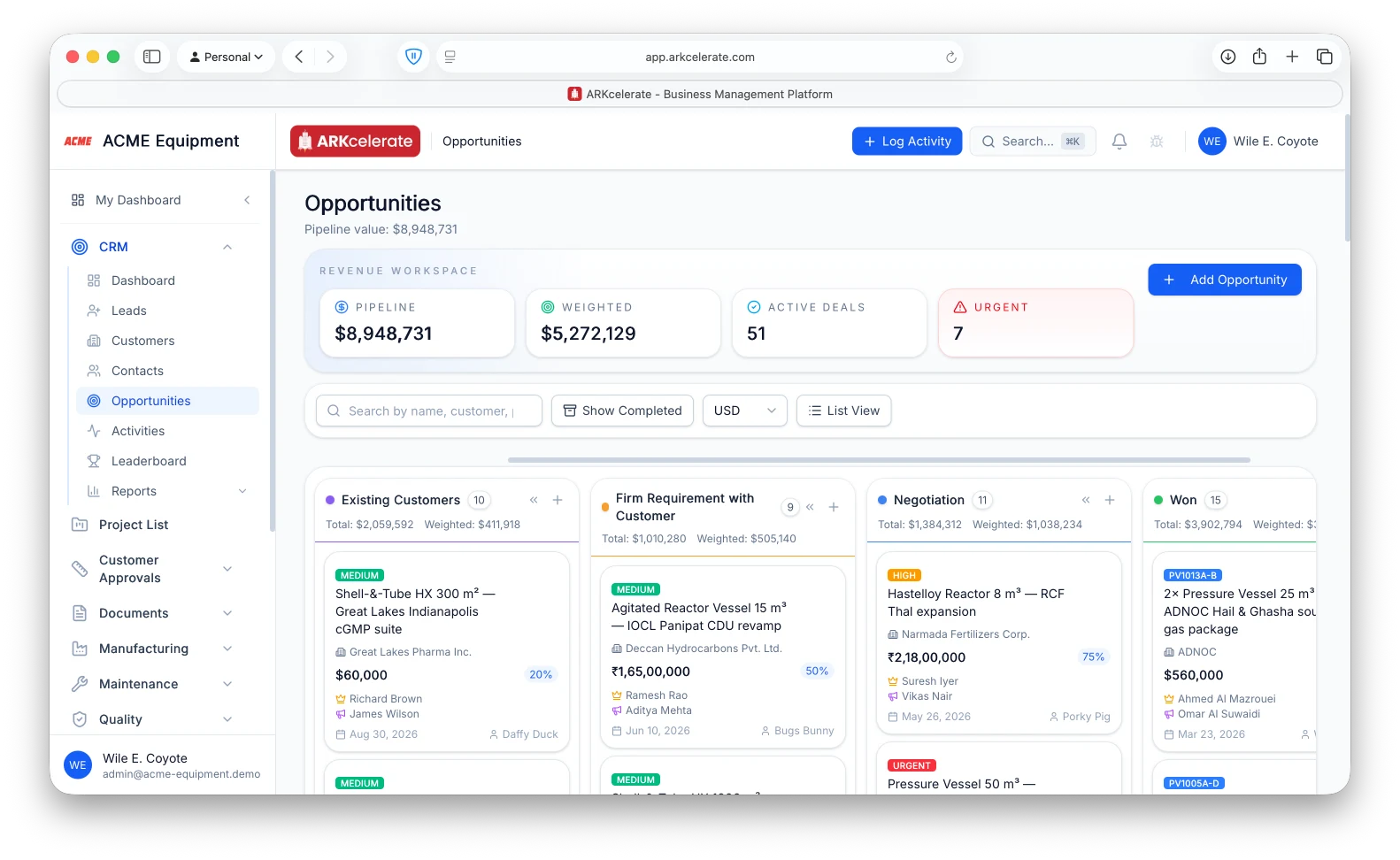
- Drag-and-drop between stages — no forms to click through
- Per-column totals: count, expected value, win-weighted forecast
- Filter by KAM, customer, value range, close date, priority
- Customisable pipeline stages per organisation (new business, renewals, service)
Feature 03
Win the deal, spin up its project — every module locks onto the same project.
Convert a won opportunity into a project and ARKcelerate gives it one global Project ID, threaded through every module. Customer Approvals, Manufacturing, Purchase, Inventory, Quality, Documents, Finance, HR — they all read and write against that single ID. The data you captured during the sale doesn’t stop there: the lead time you promised the customer, the scope you quoted, the contacts who matter, the drawings on the contract — they flow downstream and start driving deadlines, BOMs, approvals and dispatch dates automatically.
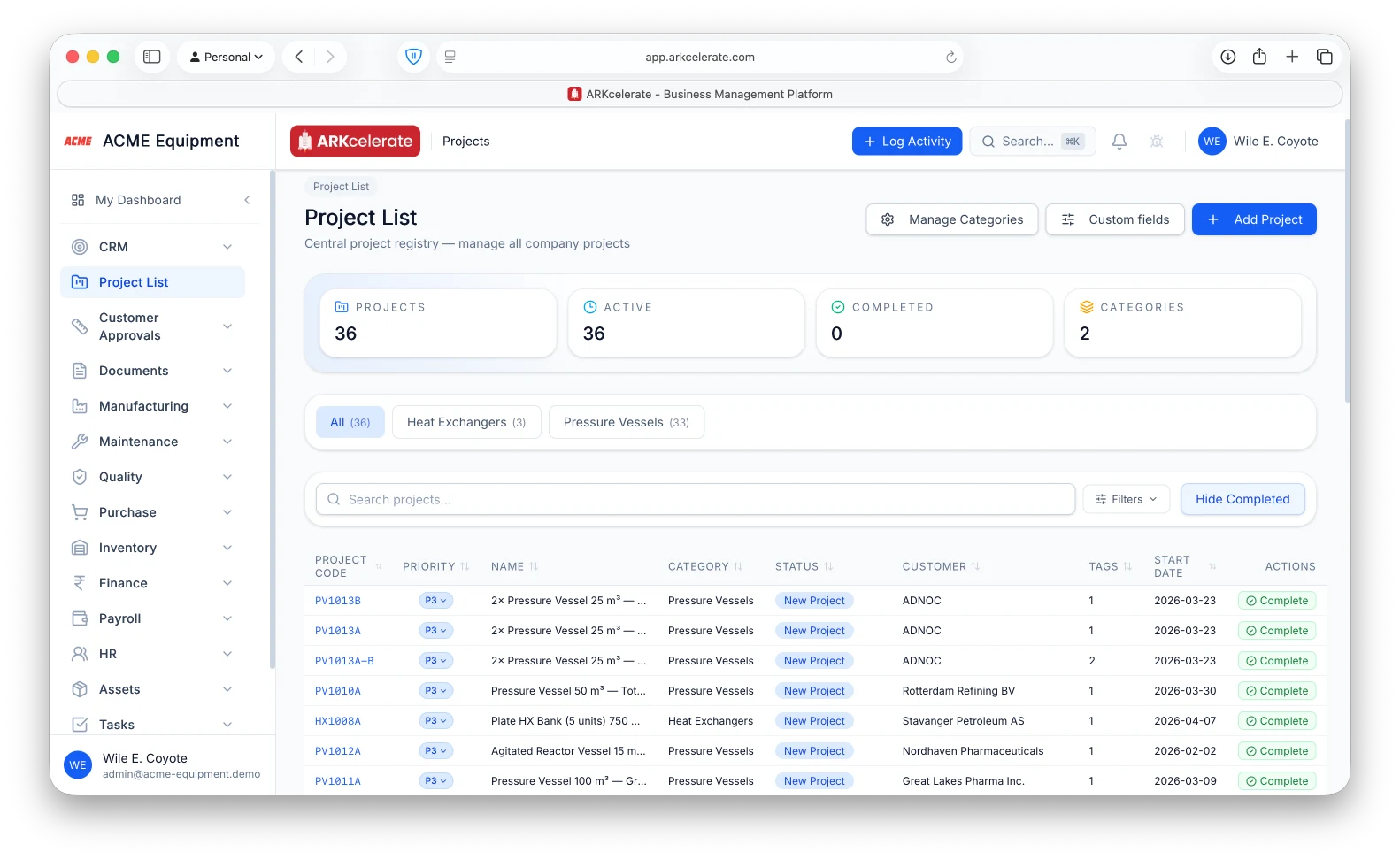
- Convert a won opportunity into a Project with a shared global project code (e.g. PV1013A)
- Lead time committed to customer + drawing-approval date auto-compute the dispatch deadline downstream
- Quoted scope + commercial terms become the manufacturing project’s baseline scope
- Approved customer drawings inherit as the engineering revision baseline
- Customer contacts + stakeholder roles carry into the project team without re-entry
- Every PO, MO, BOM, GRN, invoice, payslip and task is filterable by the same Project ID — the cost sheet writes itself
Feature 04
Never let a customer relationship go cold.
Every contact has a last-contacted date. When the clock runs past your configured threshold, the contact appears in Follow-up Needed — your daily list of people who haven’t heard from you lately. Sales execs work their way through the list so customers actually remember you when the next project lands. Snooze individual contacts, or opt a contact out entirely if they prefer less contact.
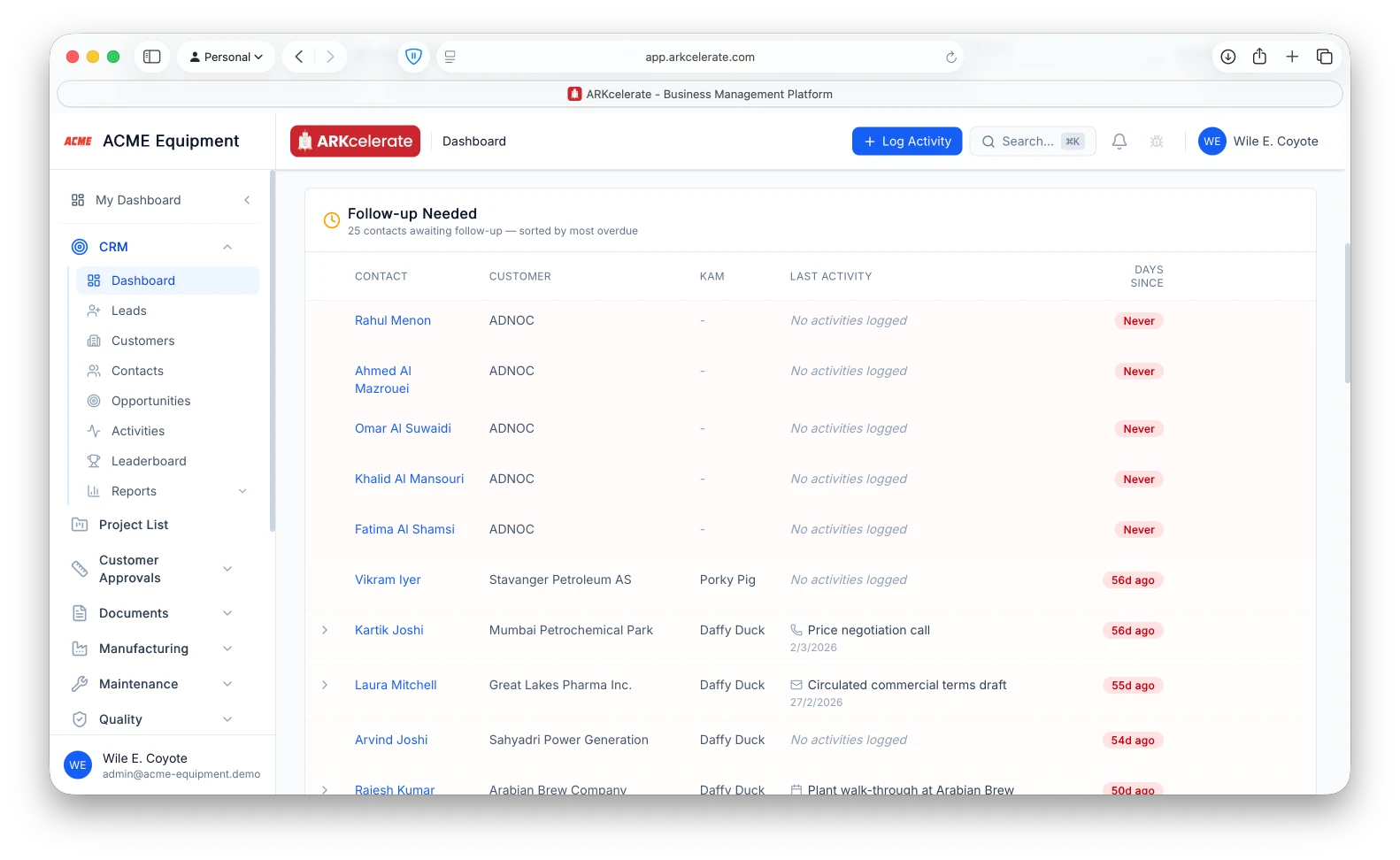
- Per-organisation follow-up threshold (default: 30 days)
- Per-KAM Follow-up Needed board, sorted by days-since-last-contact
- Per-contact snooze with a specific return date
- Per-contact skip-followup opt-out (respects customer preference)
The project-based manufacturing angle
The ownership rule that finally matches how manufacturers sell.
In a project-based shop the KAM owns the account, and every person at that account — engineering, purchase, quality — falls under the KAM. The system bakes this in: assign a KAM to the customer company, and every contact and opportunity underneath inherits that ownership. The fight over who can see whose contacts simply goes away.
Everything in the module
The full CRM feature list.
Grouped by functional area. Every feature below is included in every plan — no paywalled tiers, no “enterprise edition” unlocks.
| Area | Features |
|---|---|
| Customer companies |
|
| Contacts |
|
| Opportunities |
|
| Leads |
|
| Activities & engagement |
|
| Access, audit & reporting |
|
Try CRM alongside every other module.
One signup. Full feature access during your trial.