
Reserve stock to a project — no one else can take it.
Warehouses, batches, serials and valuations in one place — reserve stock to a project, get reorder alerts, and audit every stock movement.
What makes it unique
The features that set Inventory apart from a generic ERP.
These are the workflows big ERPs either skip or get wrong.
Project-reserved stock
Reserve a quantity for Project Orion the moment its BOM is approved — Project Nimbus can’t silently consume the same stock. Reservations carry through to picklists and warehouse staging.
Per-item valuation method
FIFO or weighted-average (moving) cost — pick per item. The valuation report costs your stock the same way every movement was costed on the stock ledger, so the on-hand value is defensible without an Excel bridge.
Batch + serial tracking where it matters
Per-item flag for batch / serial / both / neither. Critical components carry serial numbers traceable from supplier GRN to customer despatch; commodity stock skips the overhead.
Aging report with FIFO logic
See what’s been sitting in the warehouse for 90+ days, broken down by warehouse and item type. Slow-moving inventory finds itself before it becomes a write-off.
ABC analysis with auto-classification
Classify items by consumption value into A / B / C buckets automatically. Combine with X/Y/Z (consumption variability) for a full Pareto-aware reorder strategy.
Reorder-point alerts with daily-usage forecast
Per-item reorder point + safety stock. Stock below threshold generates a purchase requisition draft; daily-usage trend predicts when the next stock-out will hit.
Feature 01
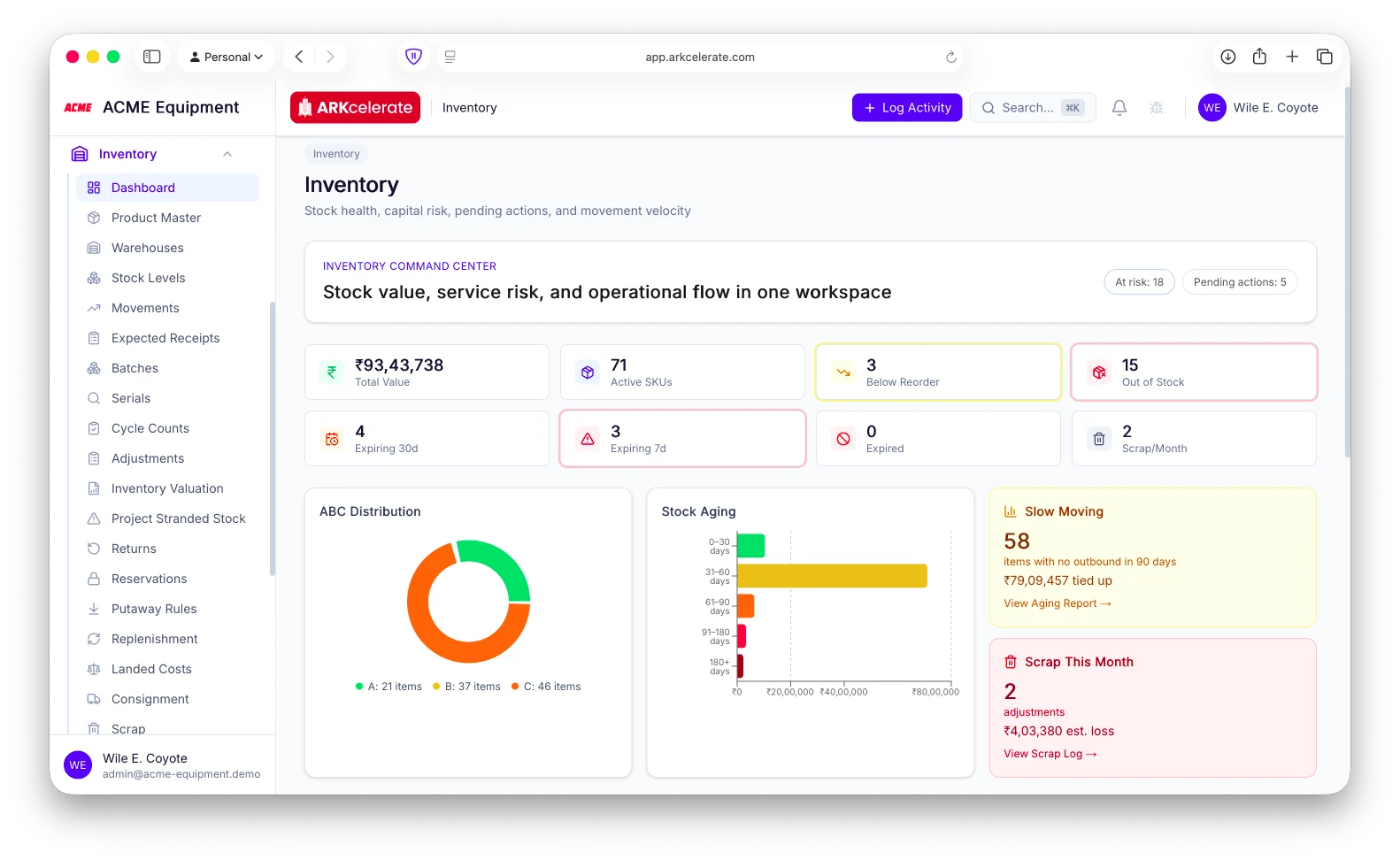
One dashboard for stock value, capital risk and movement.
The inventory command center puts the whole picture on one page: total stock value, active SKUs, what’s below reorder or out of stock, and the working capital at risk — ABC distribution, stock-aging buckets, slow-moving capital tied up, expiry windows and scrap-this-month. A stock controller or CFO opens it once and sees exactly where the money is sitting, what’s aging, and what needs action.
- Live stock value + active SKUs, below-reorder and out-of-stock counts
- ABC distribution and stock-aging buckets by value
- Slow-moving capital tied up (no outbound in 90 days)
- Expiry windows (7d / 30d / expired) and scrap-this-month loss
- Pending actions: overdue receipts, in-transit transfers, open counts
Feature 02
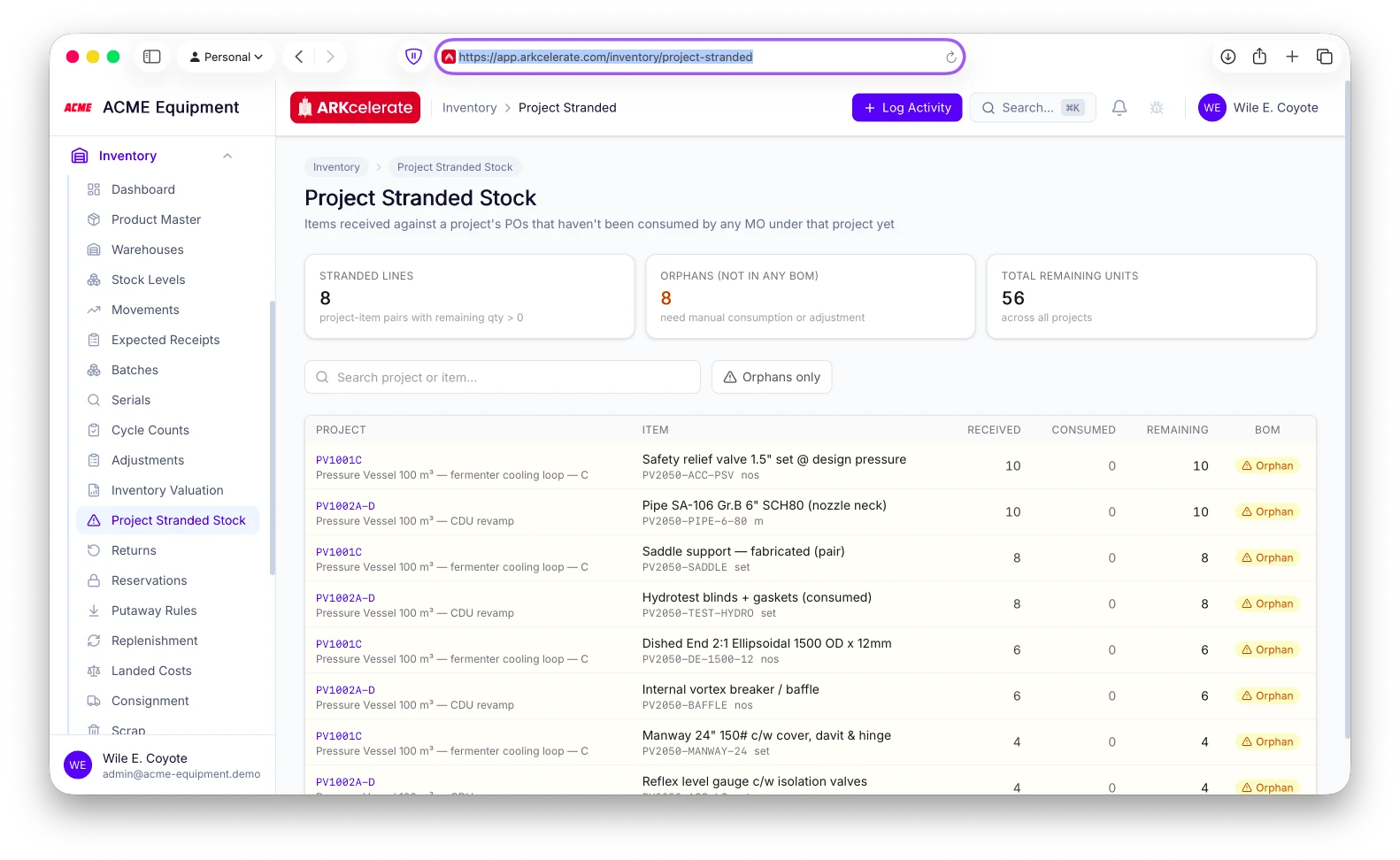
Catch project stock ordered off-BOM before you close the books.
Every PO can be tagged to a project. The Project Stranded Stock report reconciles what was received against a project (via accepted GRNs) with what its manufacturing orders actually consumed — and flags the gap. The dangerous rows are the “orphans”: material received against the project that appears in no BOM and no MO at all — over-ordering, the wrong material, or a scope change nobody logged. Catch it before the project closes, so surplus gets returned or re-allocated instead of quietly written off.
- Reconciles received-vs-consumed per project, by item
- Flags “orphan” stock — received against a project but in no BOM or MO
- Surfaces over-ordering and off-spec material before project closure
- Drill into the project / item to return, re-allocate or reconcile
Feature 03
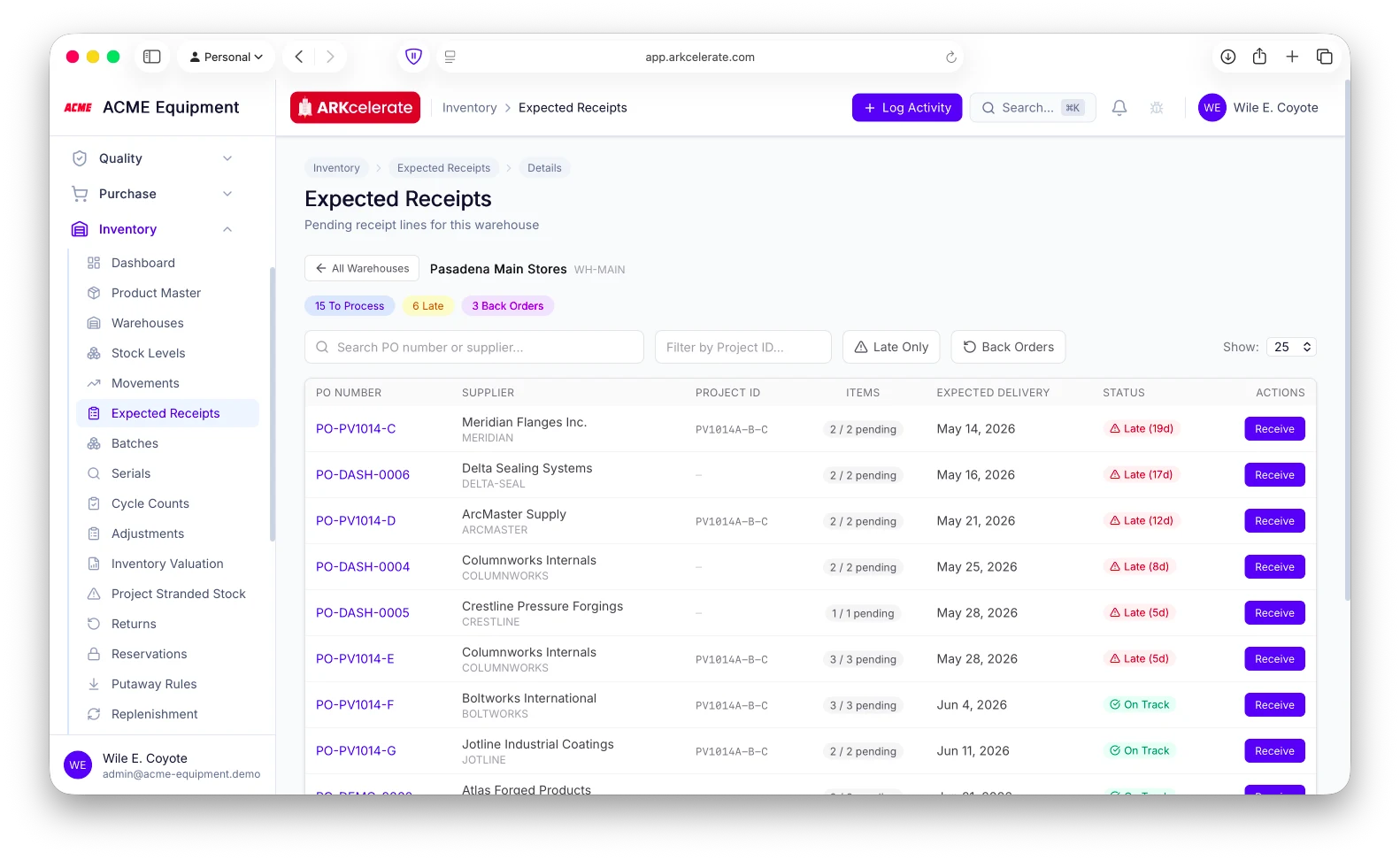
Know what’s arriving — and what’s late — on one screen.
Every open PO line that hasn’t arrived lands on the Expected Receipts screen, per warehouse, with its expected-delivery date and a live status: On Track, or Late with the exact days overdue. The counters up top — To Process, Late, Back Orders — tell a stores manager at a glance what’s slipping, what’s back-ordered, and what to chase, filterable by project. Receive a line straight from the list. No more cross-referencing POs against a calendar to find out what’s running behind.
- Every pending PO receipt line, per warehouse, on one screen
- Live On-Track vs Late status with days overdue
- To-Process / Late / Back-Order counters at a glance
- Filter by project, supplier or PO; receive a line inline
- Derived from open POs + GRNs — nothing extra to maintain
Feature 04
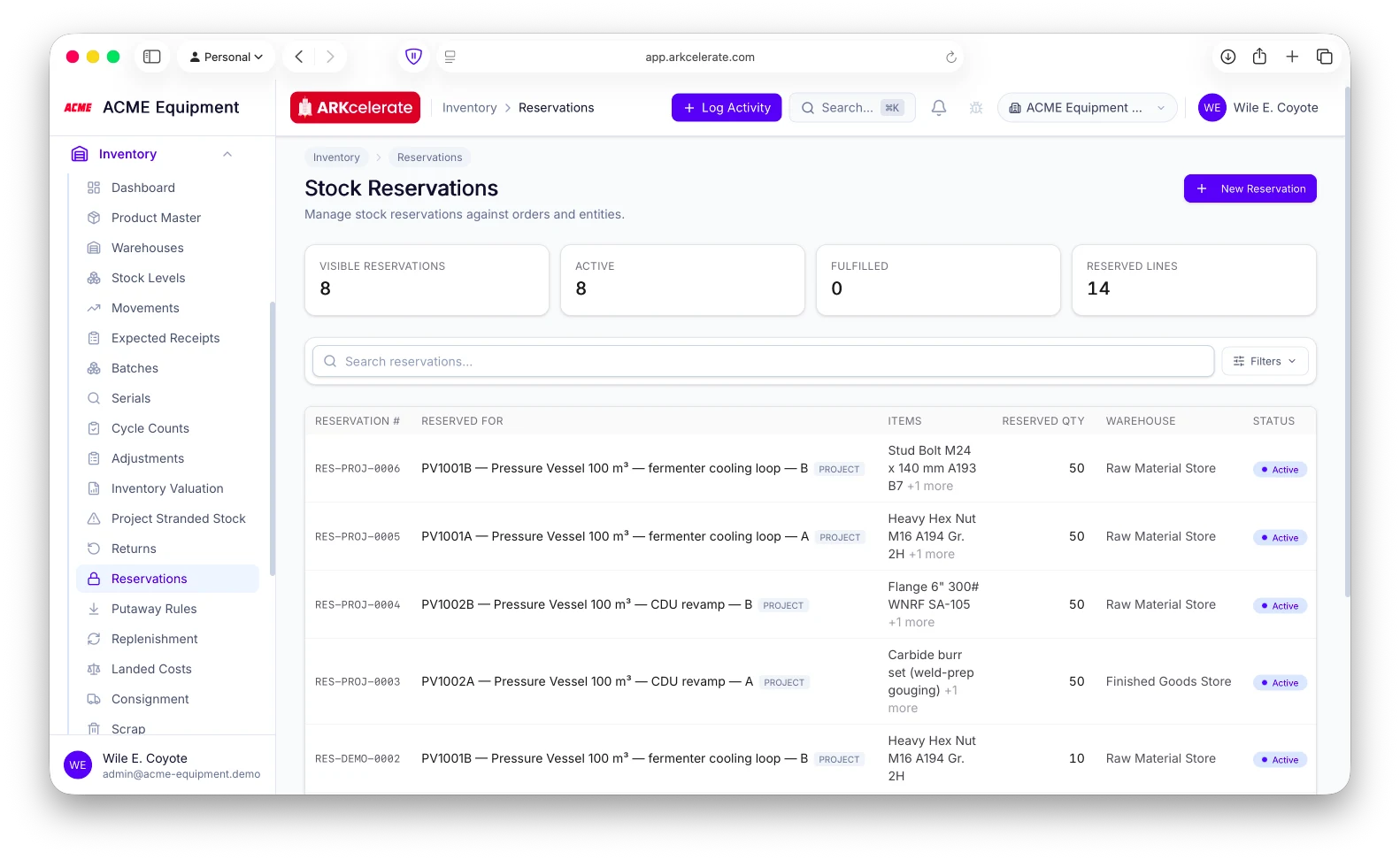
Reserve stock to a project — so another project can’t take it.
In a shop running ten projects against shared stock, the same SKU is contended constantly. Reserve a quantity to a specific project (or manufacturing order) and ARKcelerate ring-fences it: those units drop out of “available” everywhere — reorder, replenishment and the next project’s reservation all net against the reserved figure — so Project A physically cannot consume what’s earmarked for Project B. Every reservation shows which project holds it, which items, and how much.
- Allocate stock to a specific project or manufacturing order
- Reserved qty removed from “available” everywhere — no double-allocation
- See which project holds which items, and how much, at a glance
- Fulfil against the reservation when the project picks the stock
Feature 05
Multi-company stock — pooled in one warehouse, or ring-fenced per entity.
Run several legal entities on one platform and choose how their inventory behaves with a single org-level switch. Shared mode pools stock in common warehouses — one combined on-hand across all companies, no artificial separation, no duplicate SKUs. Strict mode ring-fences it: each entity sees, transacts and values only its own stock. And when stock is kept separate, moving material between sister companies becomes a proper inter-company transfer — internal valuation booked, with a vendor bill raised on the receiving company and a sales invoice on the sending one, automatically.
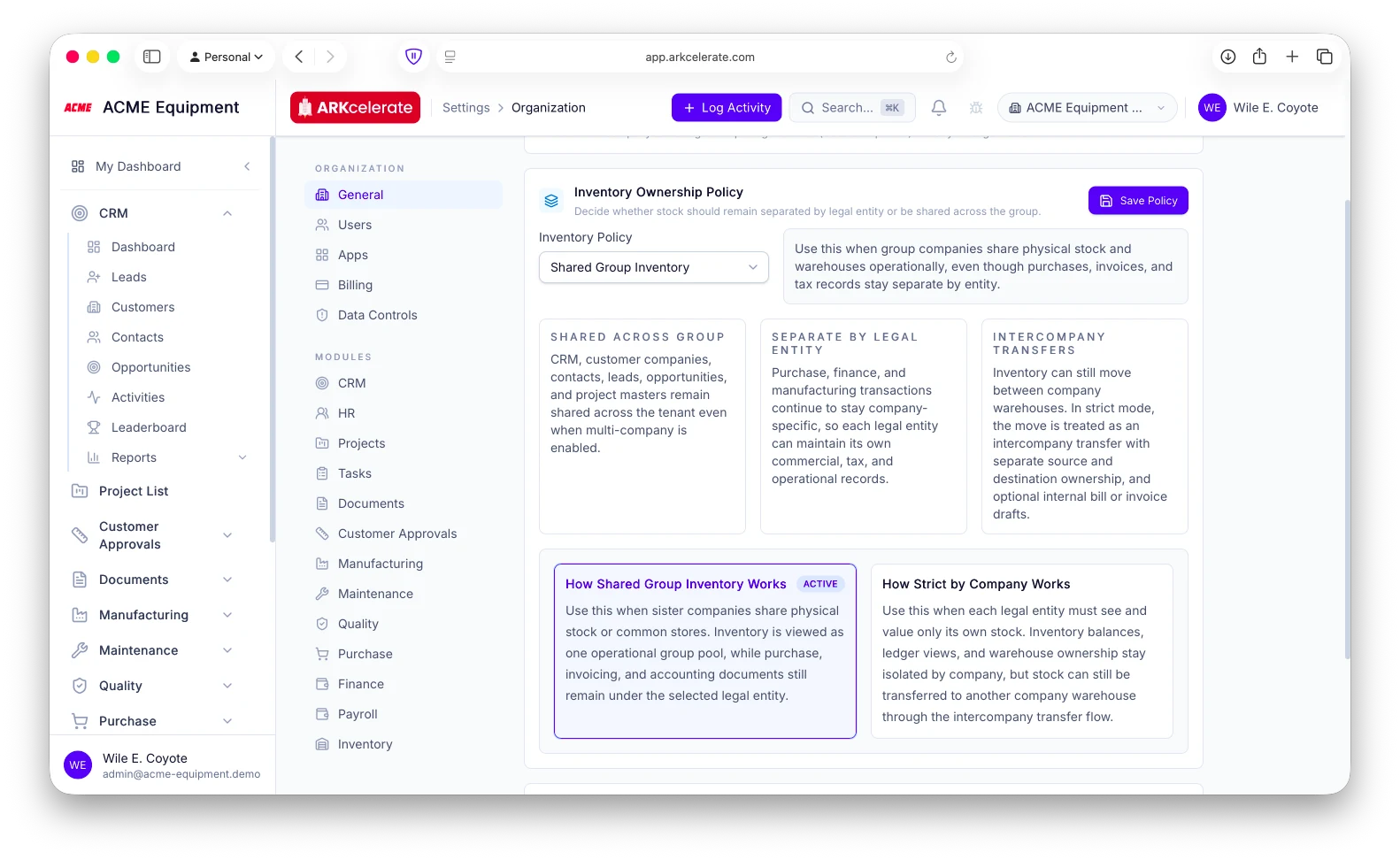
- Shared: one combined on-hand across entities — no duplicate stock
- Strict: each company sees and values only its own stock
- Per-company warehouses with scoped visibility and valuation
- Inter-company transfers with internal valuation + auto vendor-bill / sales-invoice
- One org-level switch — no re-platforming
The project-based manufacturing angle
Every unit of stock knows which project it belongs to.
In a job shop, one “on-hand” number isn’t enough. The same SKU is bought for, reserved to, and consumed by several live projects at once. So stock here belongs to a project: received against that project’s PO, reserved so no other project can take it, flagged when left over, and costed straight onto the job. You always know not just how much you have, but whose it is.
Everything in the module
The full Inventory feature list.
Grouped by functional area. Every feature below is included in every plan — no paywalled tiers, no “enterprise edition” unlocks.
| Area | Features |
|---|---|
| Warehouses |
|
| Items & SKUs |
|
| Batch & serial tracking |
|
| Stock movements |
|
| Valuation |
|
| Counts & reconciliation |
|
Try Inventory alongside every other module.
One signup. Full feature access during your trial.