
Every component. Every stage. One screen.
Track every section and component through its stages — BOMs, work orders, materials, painting, packing — and see what each build truly costs.
What makes it unique
The features that set Manufacturing apart from a generic ERP.
These are the workflows big ERPs either skip or get wrong.
Per-project production dashboard
Open a project under Manufacturing and see every section (one per tag — A, B, C, …), every component inside it, and exactly which stage of fabrication each component is at right now. Pulled from the same data that drives the percent-complete bars on the project page.
Stage templates by product type
Plate / Shell Fabrication runs through 17 stages (cut → roll → weld → DP → RT → nozzle weld → PWHT → hydrotest → paint → dispatch). Tube Bundle Assembly runs through its own. Machined Components, Bought-Out Items — each gets a stage flow that matches reality.
BOM snapshot on MO release
When the MO is released, every BOM line is snapshot into the MO. Engineering can keep editing the master BOM — the MO on the floor never retroactively changes mid-run. Extra materials can be added to an active MO when scope grows — every addition is audit-logged, so nothing changes silently.
Material tracking — PO reconciliation, MO consumption, all in one place
Issue material against an MO before any PO has even arrived; the system reconciles back when the GRN posts. The Material Tracking panel shows what was issued, what was reserved, what’s pending — per item, per project, per MO.
Painting batches + nested packing boxes
Group components into paint batches with their own coat scheme, RAL shade, number of coats and target DFT. At dispatch, build nested packing boxes (kit inside crate inside container) with dims and net/gross weights, and generate a customer-ready packing-list PDF.
Resource calendar + Gantt — areas, workers, teams
Plate Shop, Hydrotest Bay, Paint Booth assigned to a project for the build window. Welders, fitters, NDE techs assigned individually or as production crews. Calendar view shows occupancy across all projects; Gantt view shows the same data laid out by date.
True manufactured cost — material + labour + overhead per MO
Every manufacturing order carries a live Cost Summary: direct material from its issue lines, labour booked to the MO (or the MO’s share of project-level labour, split by material cost), and absorbed overhead on the basis you configure — % of labour, % of material + labour, or a rate per labour hour. Finished goods enter stock at the full manufactured cost, not just material.
Labour costing that matches how shops actually pay
Workers carry day rates; projects carry working-hours and overtime rules. Sundays and holidays can be skipped by default — and when a crew does work one, you mark exactly who did, and their hours cost at the OT rate. Book hours to a specific MO or to the whole project; either way the cost lands where it belongs.
Controlled over-issue — ETO flexibility with discipline
Scrap a part, replace a weld, absorb a design change — issuing beyond the BOM is legitimate in project manufacturing, so ARKcelerate allows it. But never silently: the extra quantity is highlighted, the issue needs an explicit confirmation, the audit log records it, and the materials table permanently shows the overage against the plan.
Shared WIP that can’t be corrupted
Material staged into the WIP pool belongs to a manufacturing order. Freehand stock moves out of a WIP warehouse are blocked — the system tells you to execute the MO instead — and a built-in integrity report compares what each MO staged against what’s physically there, so a drift shows up as a line item, not a month-end mystery.
Batch traceability through the shop floor
Issue material to an MO batch-by-batch — the picker suggests first-expiry-first-out — and the batch identity follows the movement into WIP and through consumption. When a customer asks which heat or lot went into their unit, the answer is a query, not an investigation.
Quality holds gate the shop floor
When Quality flips the hold-point gate on, a component with open critical punch points or failed required checks can’t advance to its next stage. The floor sees exactly what blocks the move; only a quality senior can override, with a written reason in the audit trail. Leave it in warn mode and it nudges instead of blocks.
Feature 01
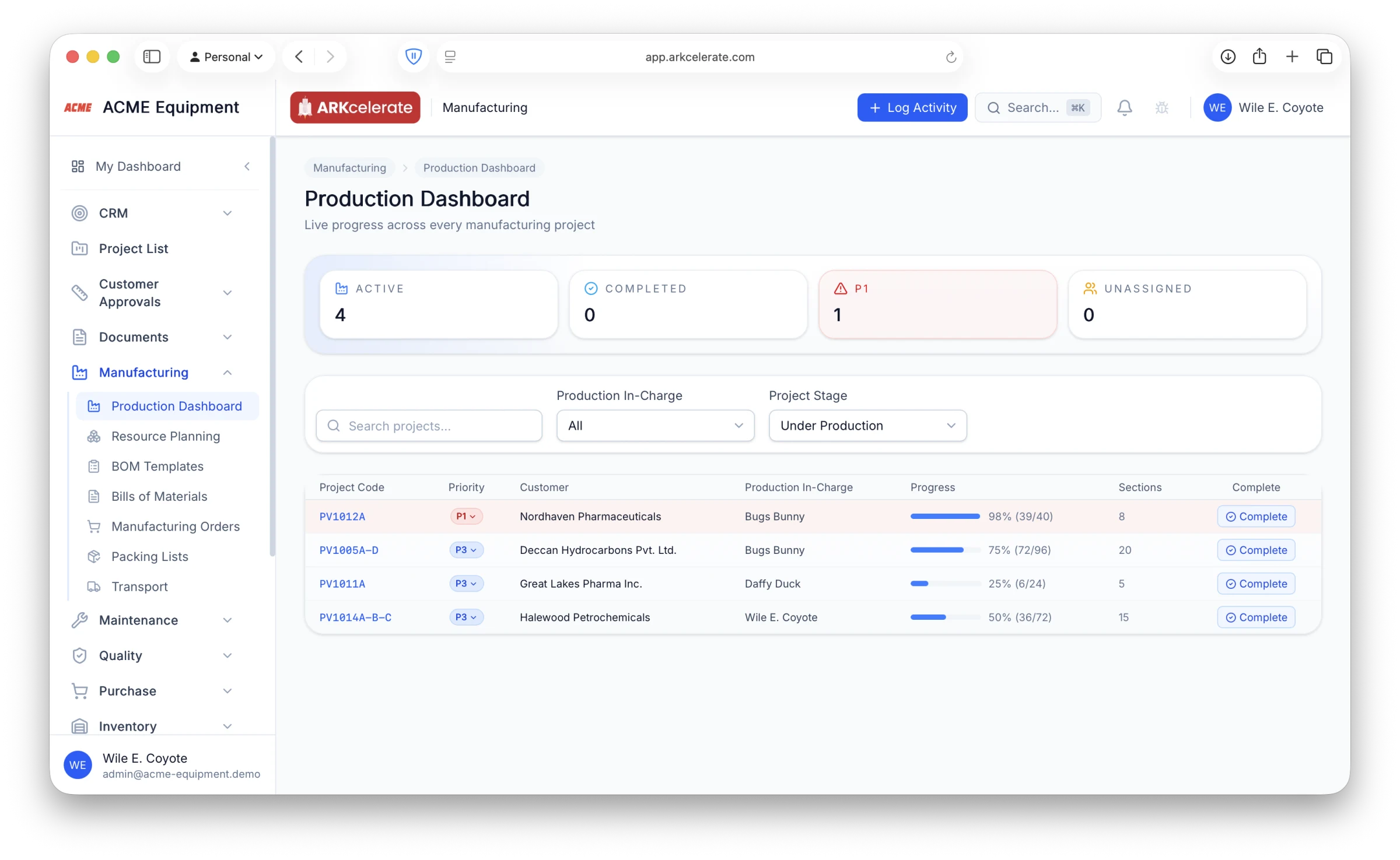
Production Dashboard — every project under production, every progress bar, on one page.
The Production Dashboard is the page the production manager opens first thing in the morning. Active count, completed count, P1 escalations, unassigned projects — surfaced as a KPI strip at the top. Below that, a single sortable table with one row per project: project code, priority pill (P1 / P2 / P3), customer, production in-charge, a live progress bar (with the exact “39 / 40 components” ratio next to it), and a section count. P1 rows are highlighted in red, P2 in amber. Filter by stage (default: Under Production), filter by in-charge, search by code or customer. Click any row to drill into that project’s section-by-section view — sections per tag, components per section, current stage on each piece.
- KPI strip at the top: Active / Completed / P1 escalations / Unassigned
- One row per project — code, priority pill, customer, production in-charge, progress bar, section count
- Progress bar derived from real component completion ratio (e.g. 39 / 40 = 98 %), not a slider
- P1 rows tinted red, P2 tinted amber — escalations stand out without scrolling
- Stage filter (Under Production by default), Production In-charge filter, free-text search
- Sorted by priority then project code so the most-urgent work always reads first
- Click a row to open the per-project view: sections per tag, components per section, current stage on each piece
Feature 02
Resource Planning — see at a glance who’s on which project, what’s available, where capacity is going.
Open Resource Planning and the entire shop floor’s capacity is laid out on one page. A live “Available Resources” band at the top tells you which shopfloor areas and which workers are unassigned right now. Below that, every active project gets its own card — the areas it’s booked, the workers tagged to it, and the date window. Group your most-used welders, fabricators and supervisors into a production team (“PV1014 Production Crew”, “Hydrotest Cell B”) and assign the team in one click — every member of the team picks up the project assignment together. No spreadsheet, no whiteboard — the bays and the people are visible side-by-side, and so is the gap between what you have and what you’ve booked.
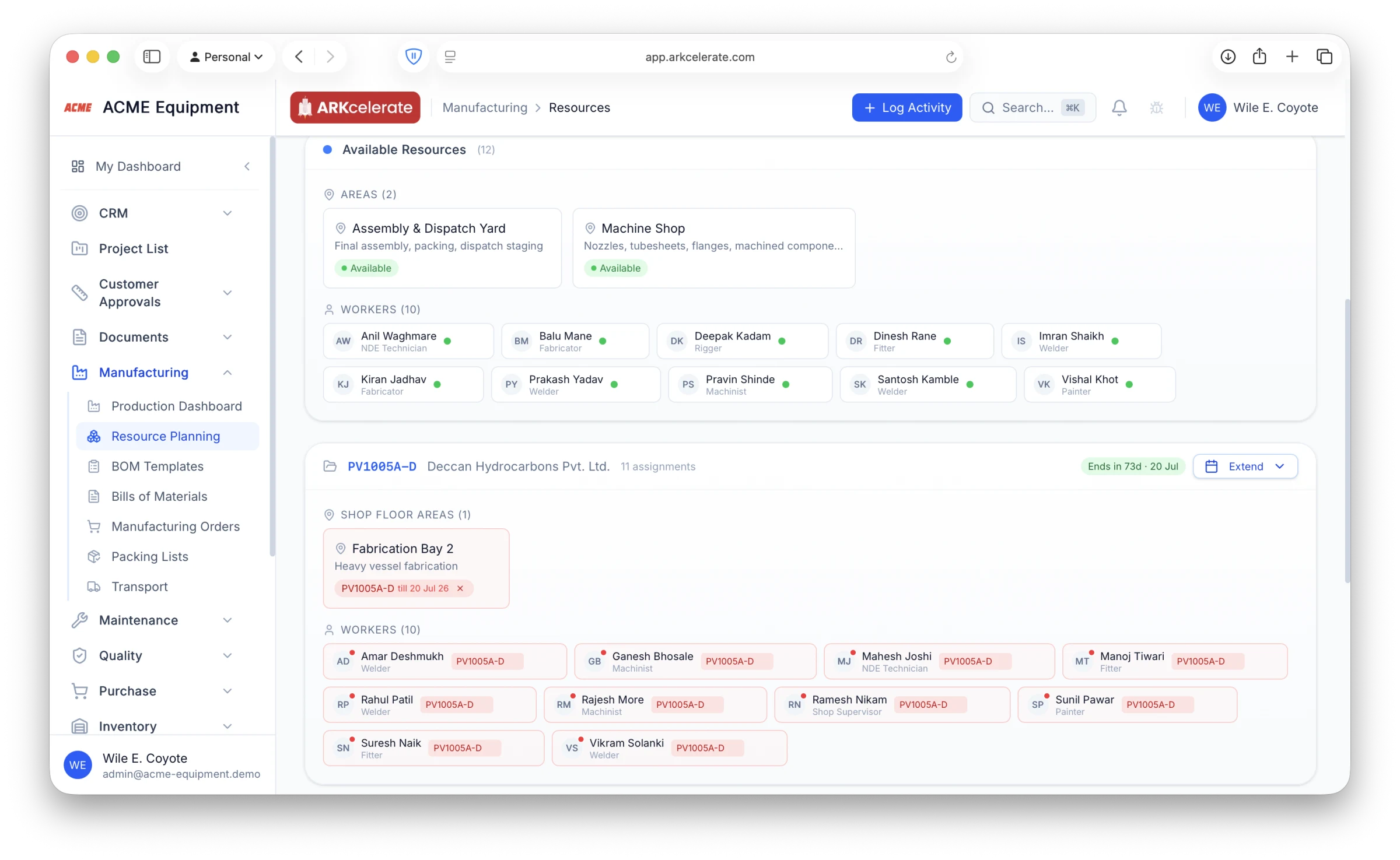
- Available-resources band — areas + workers free to assign right now, surfaced at the top of the page
- Per-project capacity card: shopfloor areas booked, workers tagged, end-date countdown, total assignment count
- Workers tagged by skill (Welder, Fitter, Machinist, NDE Technician, Painter, Supervisor) so you book the right person for the job
- Production teams — group N workers as a crew and assign the team to a project; every member inherits the assignment
- Visual utilisation: every worker either sits in the green “Available” pool or under one of the project cards — you can’t lose track of who’s on what
- Drag-to-extend the assignment date window when a project slips; gaps between projects show idle days you can fill
Feature 03
Live visual progress for every component on the shop floor — one project, one screen.
Click into any project on the Production Dashboard and you see the build laid out the way the foreman thinks about it: sections per tag (Shell & Heads, Nozzles & Manways, Internals, Supports, Accessories), and inside each section, every component as its own tile. The green fill inside the tile shows exactly how far through its fabrication stages that piece has progressed — half-green = halfway through Plate Cutting → Rolling → Welding → NDE → PWHT → Hydrotest → Paint → Dispatch Ready. The whole project’s status reads off one page; the supervisor doesn’t need to ask anyone, the floor doesn’t need to update a spreadsheet.
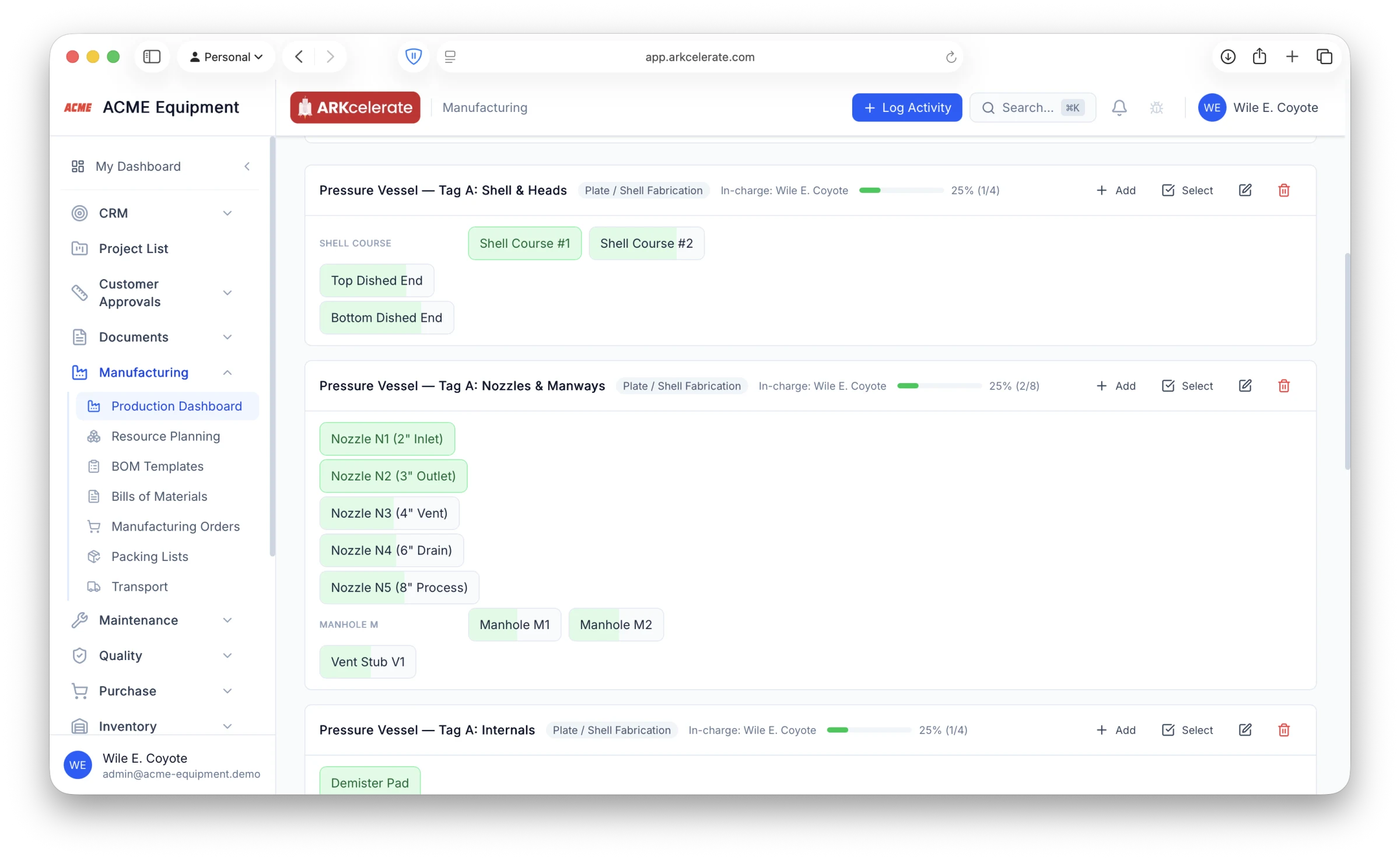
- Each component is a tile; the green fill is the live percent through its stage template — visible from across the room
- Sections grouped by tag (Tag A / B / C) for multi-deliverable projects, with per-section progress bar + in-charge
- Stage templates are fully customisable per product type: Plate / Shell Fabrication (17 stages), Tube Bundle Assembly, Machined Component, Bought-Out Item — define your own
- Add components in bulk: one click adds an Individual Component (“Top Dished End”), a Series (“FS1” to “FS30” in one shot), or a Bought-Out item with its own stage flow
- Bought-out components carry their own simple flow (Not Ordered → Ordered → Received → Inspected) — track procured items right next to fabricated ones
- Series prefixes auto-group on the page so 30 components in a row stay visually compact (Shell Course, Manhole M, Nozzle N…)
- Click any tile to see stage history, who advanced it, when, and any alerts raised against it
Feature 04
Packing Lists — from shop floor to dispatch crate, with the customs PDF one click away.
Packing Lists turn the messy reality of shipping a 3-vessel project into one clean, queryable record. Add a box, capture its dimensions and net/gross weight, then drop the components that go inside it onto the box from a visual list of everything the project has produced. Need a smaller box inside a larger crate (a spares pouch tucked inside the accessories crate, or a hardware kit inside the shell crate)? Add it as a nested box — it carries its own dimensions, weight and component list, but rolls up to its parent for the master tally. Once the list is complete, hit Export PDF for a customer-ready packing list — or hand it to the freight forwarder for export customs clearance.
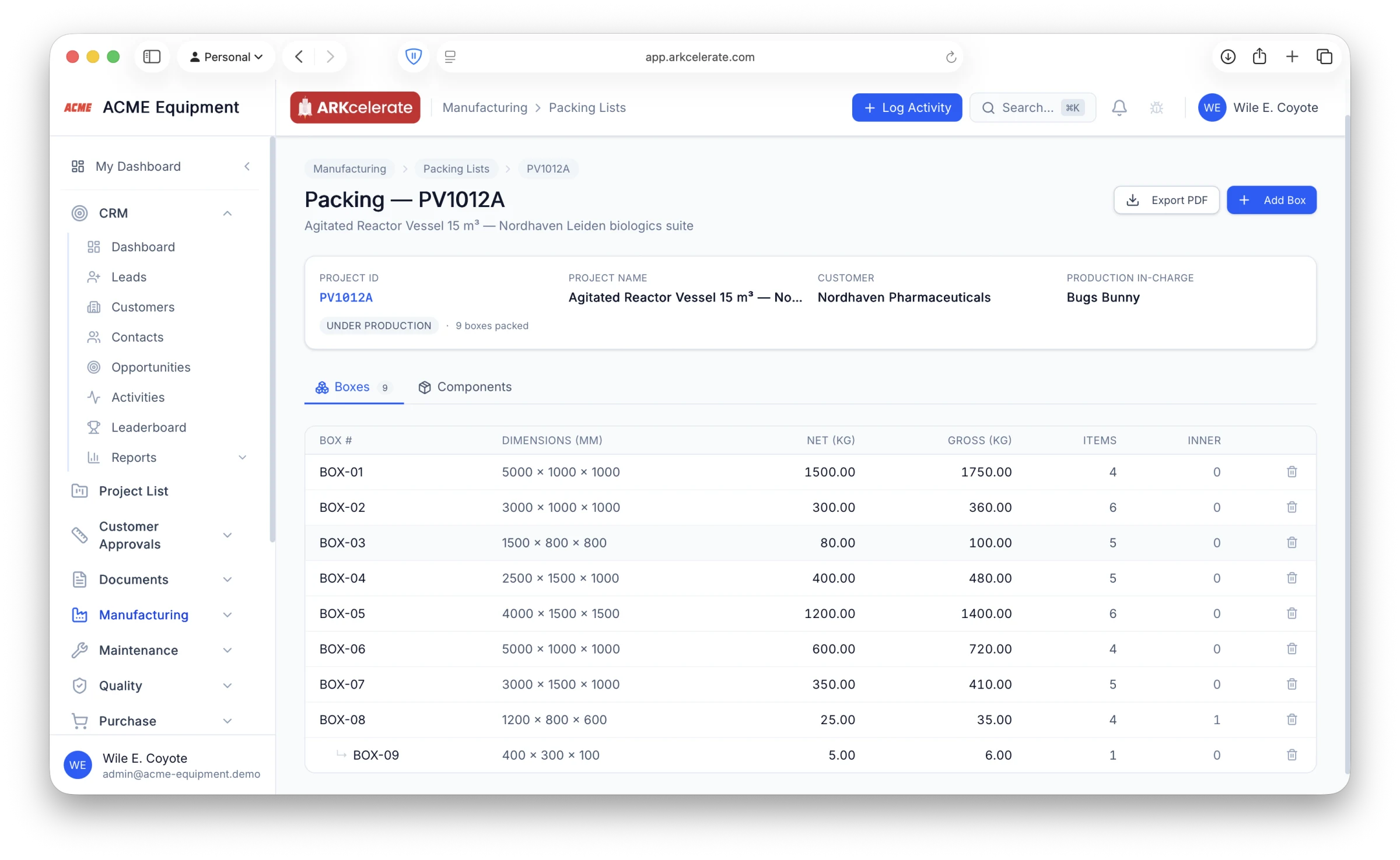
- Visual box-builder — drop components from a project-wide list onto each box; quantity per component is captured per box
- Per-box dims (mm) and net + gross weight in kg, exposed in a single sortable table
- Box-inside-box nesting — each inner box has its own components + weight + dimensions, and a separate packing list of its own
- Live monitoring during packing — see at a glance which components are packed, how many remain, and which boxes are still empty
- “Export PDF” generates a customer-ready packing list (with org logo + project ID branding) for the customer or for export customs clearance
- Linked to the project + manufacturing project, so dispatch + customs costs feed back into project profitability automatically
Feature 05
One-click requisition from a BOM — only the gap, not the full list.
Releasing a Manufacturing Order against a BOM normally means a procurement person sitting with a spreadsheet, line-by-line, deciding what to actually order — because the warehouse already has half of it on the rack. ARKcelerate does that math for you. Click “Create Requisition” on the MO page and the system walks every BOM line, nets the required quantity against current stock + already-reserved quantity across the warehouses scoped to this MO, and emits a Purchase Requisition with only the lines where there’s a real shortage. Lines fully covered by on-hand stock are skipped automatically — no over-ordering, no manual triage. Each generated line auto-fills the preferred supplier (or last-purchase supplier as a fallback), the latest unit cost, and a required-by date computed from the MO’s planned start minus the org’s material lead-time setting. The PR lands as a draft you can review and submit; if you want to override the netting on a specific line and order the full BOM quantity anyway, there’s a “use BOM qty” toggle on the PR.
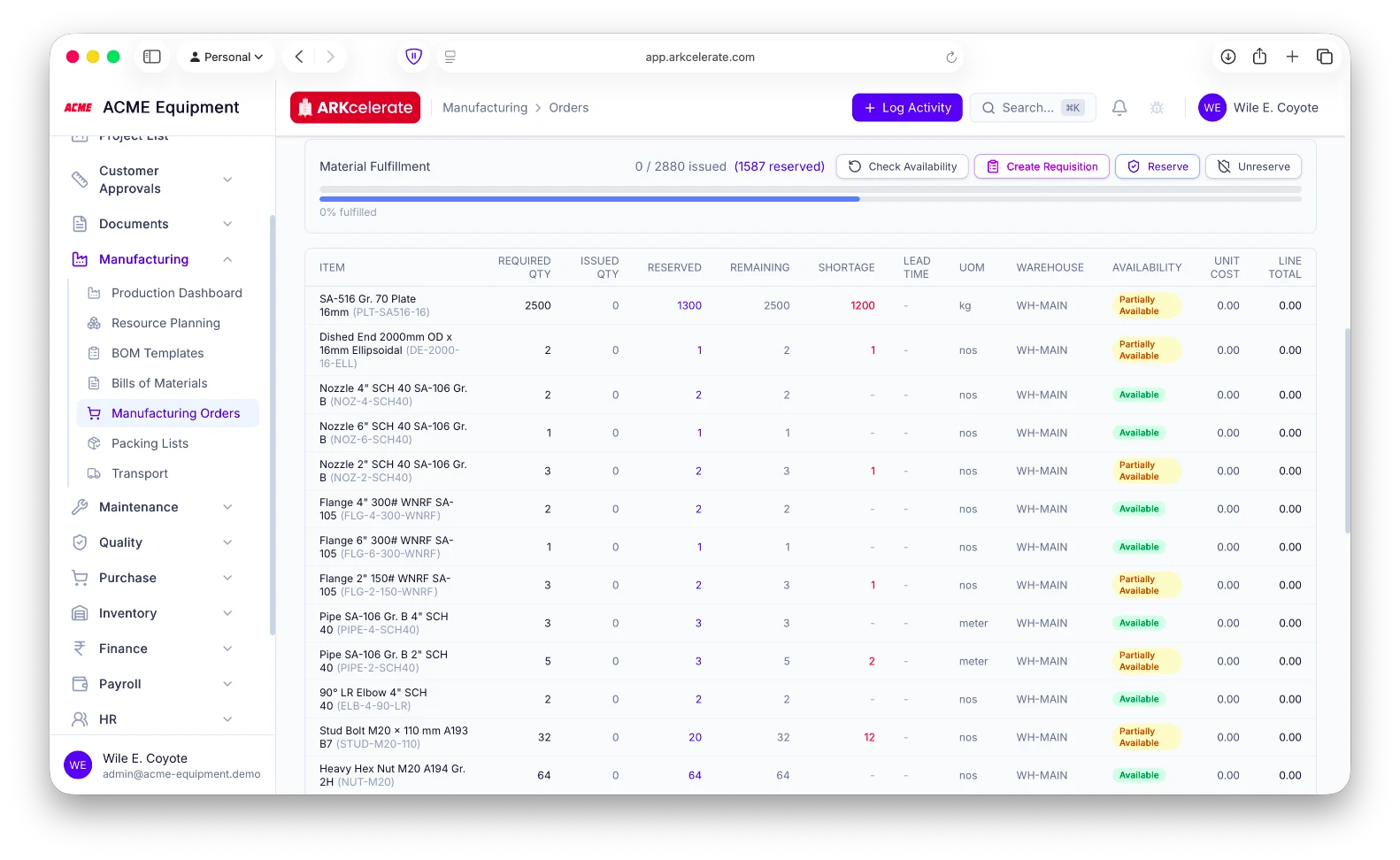
- One button on the MO page — “Create Requisition” — generates the PR; once created, it changes to “View Requisition” so you can’t double-issue
- Stock netting per line: required − (on-hand + reserved) across all MO-scoped warehouses; only the shortage flows into the PR
- Lines fully covered by stock are silently dropped — no zero-qty noise, no “phantom” order lines
- Multi-warehouse aware — pulls available + reserved balances across every warehouse scoped to the MO
- Auto-suggests the preferred supplier on each line (with last-purchase supplier as fallback) and the latest unit cost
- Required-by date auto-computed from the MO’s planned start minus the org’s material lead-time setting (configurable)
- PR lands as a draft — fully editable before submit; nothing is committed to the supplier until you approve and send
- “Use full BOM qty” toggle per line to disable the netting where the team wants buffer stock
- Audit-logged at both ends — the PR creation event AND the MO→PR link are recorded for traceability
- Stops the spreadsheet-and-coffee “what do we actually need to buy?” ritual every project starts with
The project-based manufacturing angle
Job shops don’t plan machine capacity. They plan components moving through stages.
A milling cell, a welding bay and a hydrotest pit aren’t interchangeable machine slots — they’re distinct operations with their own queue, their own crew and their own next-step. ARKcelerate models the shop floor that way: every component carries its current stage, the crew and bays are booked to the project for its build window, and the project dashboard shows you which pieces are ready, which are stalled, and which are queued for the next stage.
Everything in the module
The full Manufacturing feature list.
Grouped by functional area. Every feature below is included in every plan — no paywalled tiers, no “enterprise edition” unlocks.
| Area | Features |
|---|---|
| Project manufacturing dashboard |
|
| Bills of materials (BOMs) |
|
| Manufacturing orders (MOs) |
|
| Costing — true cost of goods manufactured |
|
| Resources — areas, workers, teams |
|
| Painting + packing + transport |
|
Try Manufacturing alongside every other module.
One signup. Full feature access during your trial.