
Approve the drawing — the dispatch deadline sets itself.
Track every drawing revision, customer comment and sign-off in one place — so the shop floor only builds what the customer has actually approved.
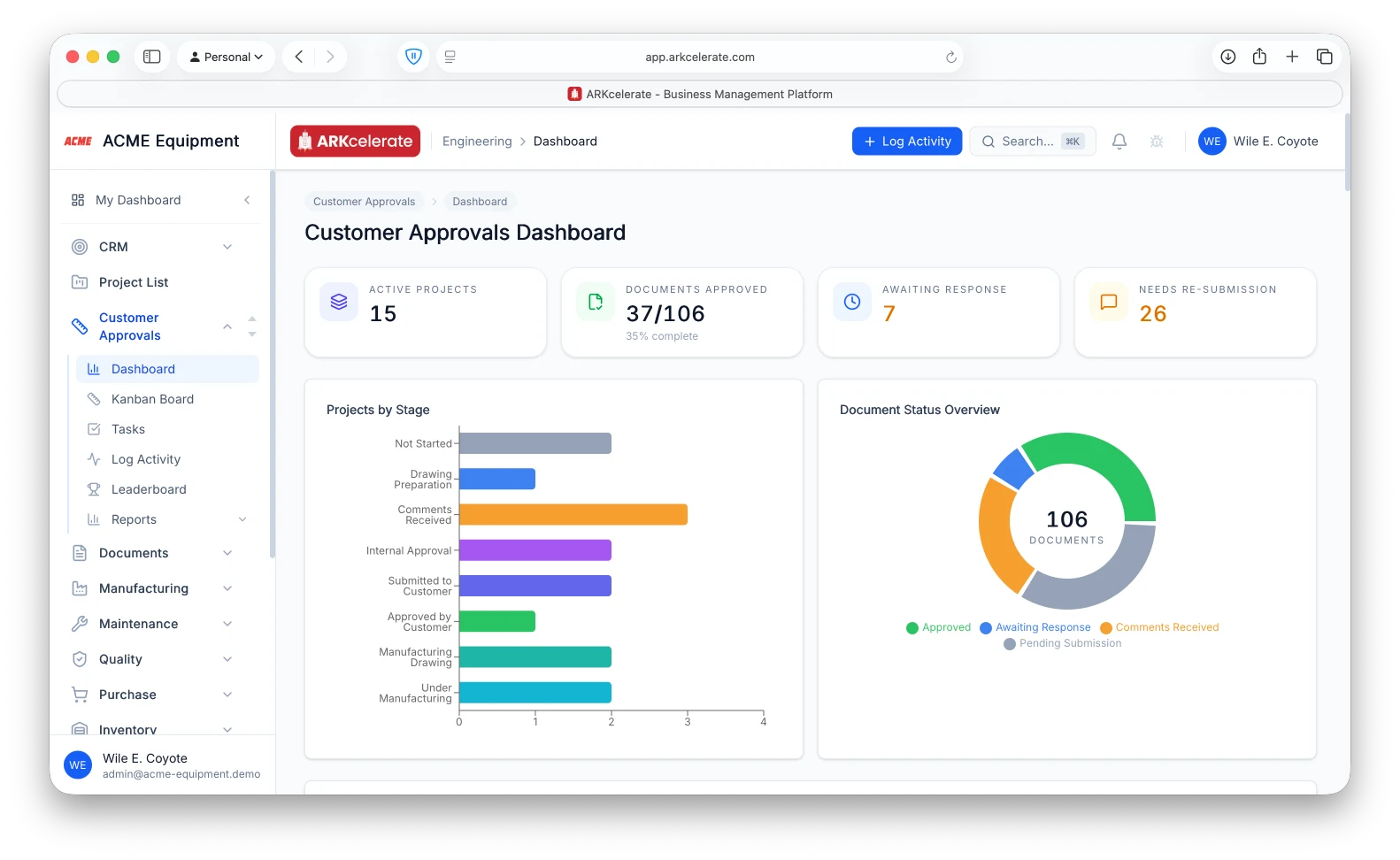
The customer-approval workflow
Four steps. A reminder waiting at every one of them.
Chasing sign-off is the bit project-based shops bleed days on. ARKcelerate makes the chase part of the workflow — each step has its own reminder cadence, so your team always knows what is waiting on the customer and what is waiting on them.
- 1Step 1
Submit Documents
Engineering uploads drawings, calc sheets and supporting docs into the project register and records the submission to the customer.
Auto-reminder
If the planned submission date passes and nothing has been uploaded, the engineer + engineering lead get a daily task on their board until the submission goes out.
- 2Step 2
Track Customer Comments
When the customer responds, the engineer logs their comments against the exact document and revision they refer to — threaded with the reply, so there is no email archaeology later.
Auto-reminder
If the customer hasn’t responded within the agreed turnaround (e.g. 7 days), the KAM gets a follow-up task to chase it, and the days-waiting counter turns red on the dashboard.
- 3Step 3
Submit Revisions
Engineering addresses each comment, cuts a new revision, marks the comment resolved. Every revision keeps its own diff, attachments, and reviewer trail.
Auto-reminder
A revision sitting open past its internal SLA auto-creates a task on the engineer’s and engineering lead’s boards with a days-overdue counter visible on the dashboard.
- 4Step 4
Obtain Customer Approval
The engineer records the customer’s sign-off against the latest revision. That revision becomes the cleared one — manufacturing works to the customer-approved version.
Auto-reminder
Approvals pending past the agreed window raise a follow-up task for the KAM. The moment the approval is recorded, the project team is notified and the manufacturing clearance date is stamped.
What makes it unique
The features that set Customer Approvals apart from a generic ERP.
These are the workflows big ERPs either skip or get wrong.
Reminders at every step
ARKcelerate doesn’t just track customer approvals — it actively chases them. Submission overdue? Engineer gets a daily task. Customer silent past 7 days? KAM gets a follow-up task to chase it. Revision past SLA? Days-overdue counter front-and-centre on the dashboard.
Every submission and approval, timestamped
Each revision records when it was submitted, what the customer came back with (comments / approved-with-comments / approved) and the date — a complete, timestamped trail that tells you exactly which side ate the days if a project runs late.
Manufacturing waits for clearance
Manufacturing is cleared only once the customer approves the critical drawing — so the floor builds to the customer-approved revision, not a draft still in review. Engineering can keep iterating on the next revision in parallel.
Clearance date drives the dispatch deadline
The moment the critical drawing is approved, ARKcelerate stamps the Manufacturing Clearance Date, adds the lead time committed back in CRM, and shows the resulting Dispatch Deadline on the project — one date the whole team plans around.
Every approval in one view
Open the project: every doc awaiting customer eyes, every comment awaiting your reply, every approval running past its window. Cross-project KAM dashboard rolls the same view up across customers — the engineering lead’s morning starts here.
Per-revision diff + attachment register
Every revision keeps its own drawing set, calc sheets, vendor data and reason-for-change — so your engineers can see exactly what moved between revs, and nothing about the history is lost.
Feature 01
Every document tracked from submission to sign-off — with reminders firing on both sides.
Open any project and you see the full customer-approval scope: every drawing, calc sheet and datasheet, each with its own submission revision, current status, days-in-stage counter, and the person responsible. The green progress bar at the top shows the percentage of the contract scope already approved — at a glance, you know how close the project is to releasing for production. And the moment something goes stale, the right person hears about it.
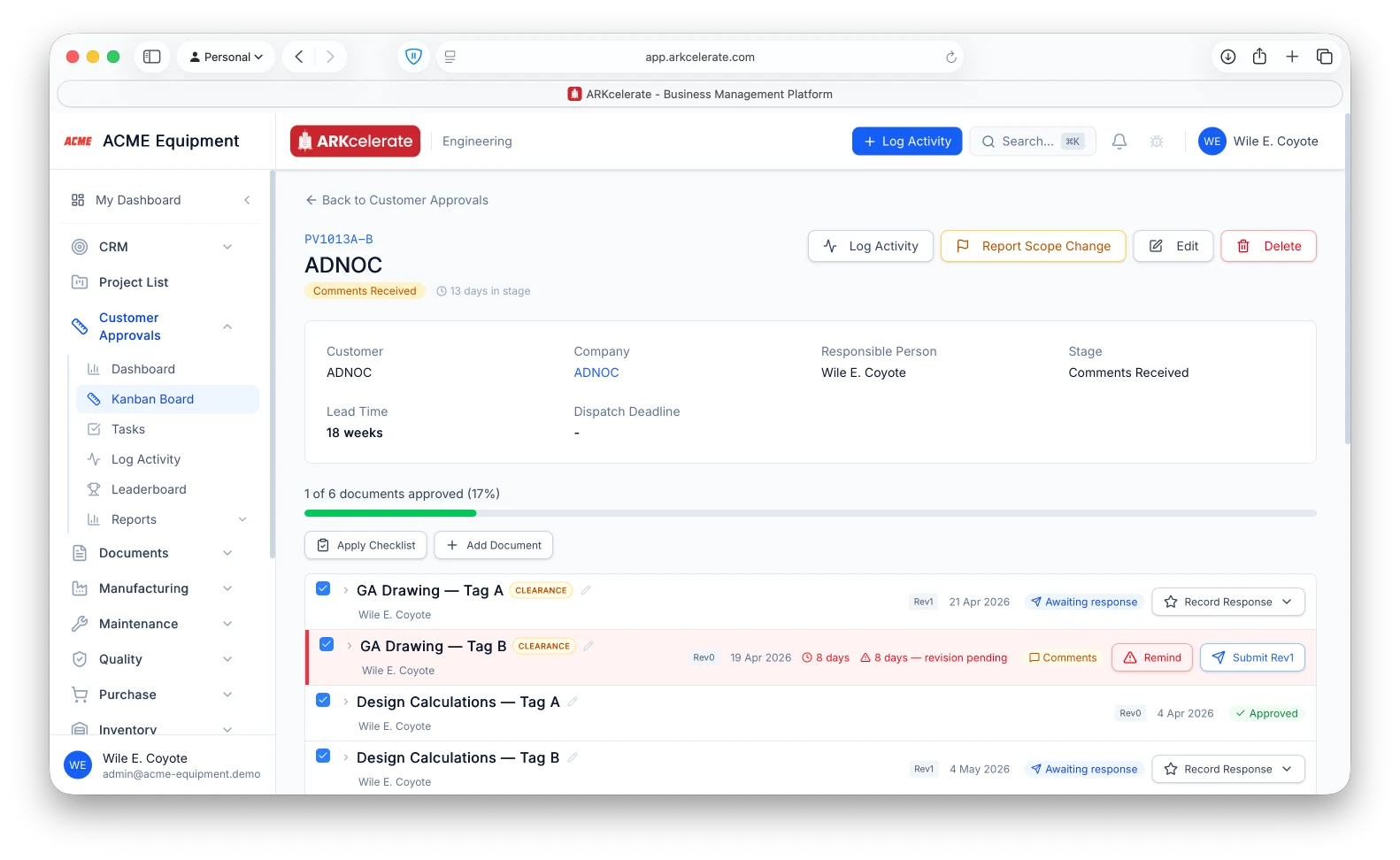
- Per-document tracking — current revision, status pill, days-in-stage, responsible engineer
- Auto-reminder to the responsible engineer and lead when the customer is silent past the configured window (customisable per project / per document)
- Auto-reminder to your engineer if a revised document isn’t submitted within 7 days of customer comments (customisable)
- Green progress bar shows % of contract documents approved — the project’s ready-to-release health, at a glance
- One-click "Remind" to re-surface a stalled document on the responsible engineer’s queue
- Submit Rev 1, Rev 2, … directly from the row — no context-switching to a separate upload page
Feature 02
Every project, every stage, one Kanban board — and it moves itself.
The Customer Approvals Kanban gives the engineering lead a bird’s-eye view: every active project sliced by where it is in the approval pipeline — Drawing Preparation, Comments Received, Internal Approval, Submitted to Customer, Approved by Customer. Drag a project across columns when you want to, or let ARKcelerate move it for you. The board reflects reality without anyone manually keeping it tidy.
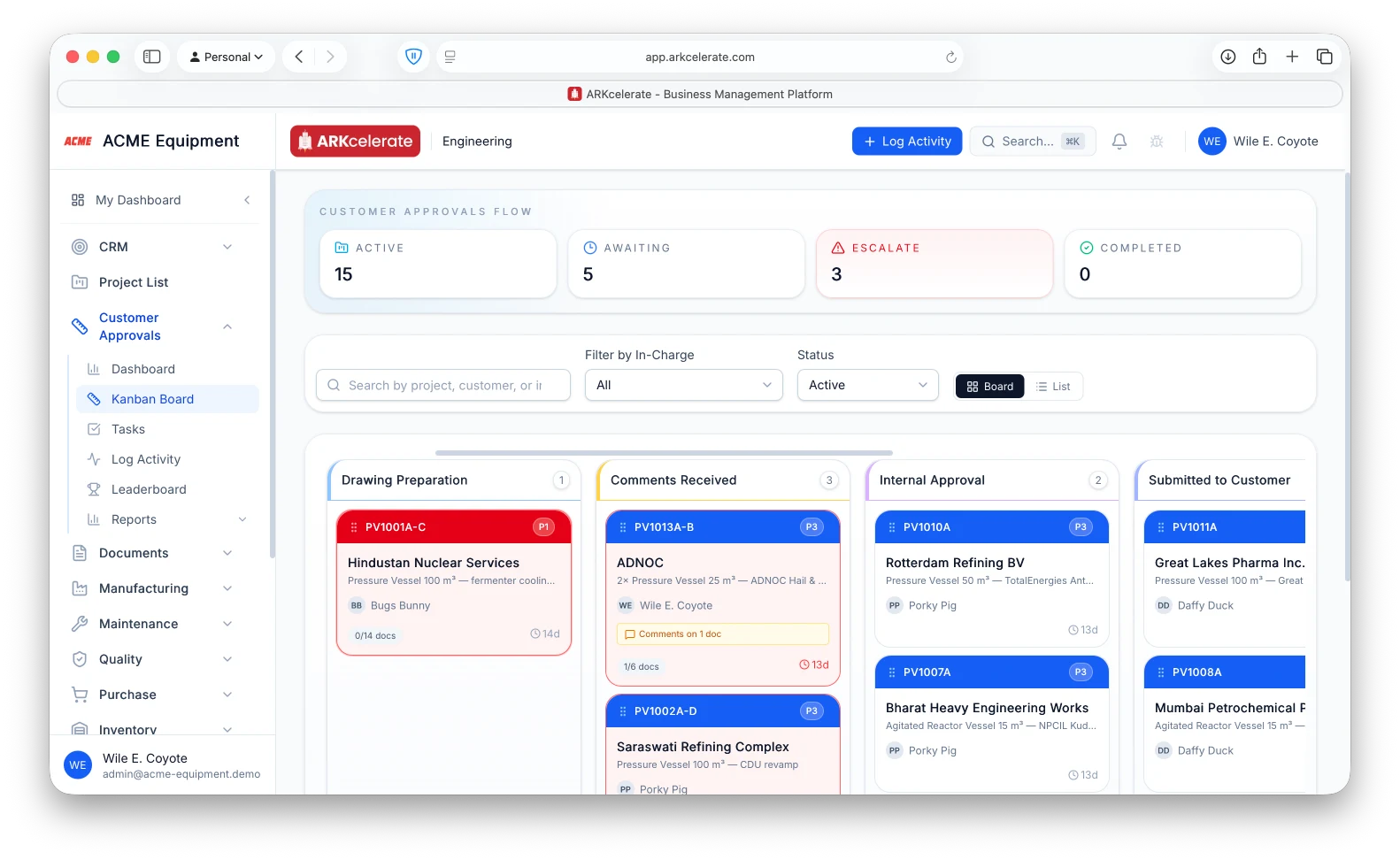
- Stage columns mirror the real approval pipeline (Drawing Prep → Comments Received → Internal Approval → Submitted to Customer → Approved by Customer)
- Auto-advance: the moment a customer comment lands on any document in a project, that project jumps to "Comments Received" — no manual drag
- Auto-advance: the last document approved moves the project into "Approved by Customer" automatically
- Tile turns red when documents are overdue for submission — instant visual escalation, no dashboard digging
- Per-tile context at a glance: project ID, customer, equipment, in-charge, doc-count (e.g. 1/6 docs), days-in-stage
- Top strip: live counts of Active, Awaiting, Escalate and Completed across the org
- Filter by In-Charge, search by project / customer / project code, or flip to List view in one click
Feature 03
Every submission, every reply — timestamped. The Dispatch Deadline computes itself.
Each document carries a complete revision trail: when we submitted Rev 0, when the customer commented, when we resubmitted Rev 1, when they approved with comments, when we closed the loop with Rev 2. If the project ends up running late, the trail tells you instantly which side ate the days — your engineer or the customer’s reviewer. No defensive emails, no shared-drive forensics. The dates are the record. And there’s one date the entire factory plans around: the Manufacturing Clearance Date. The moment the critical document is fully approved, ARKcelerate captures that date, adds the lead time you committed to the customer back in CRM, and shows the resulting Dispatch Deadline on the project for every downstream team.
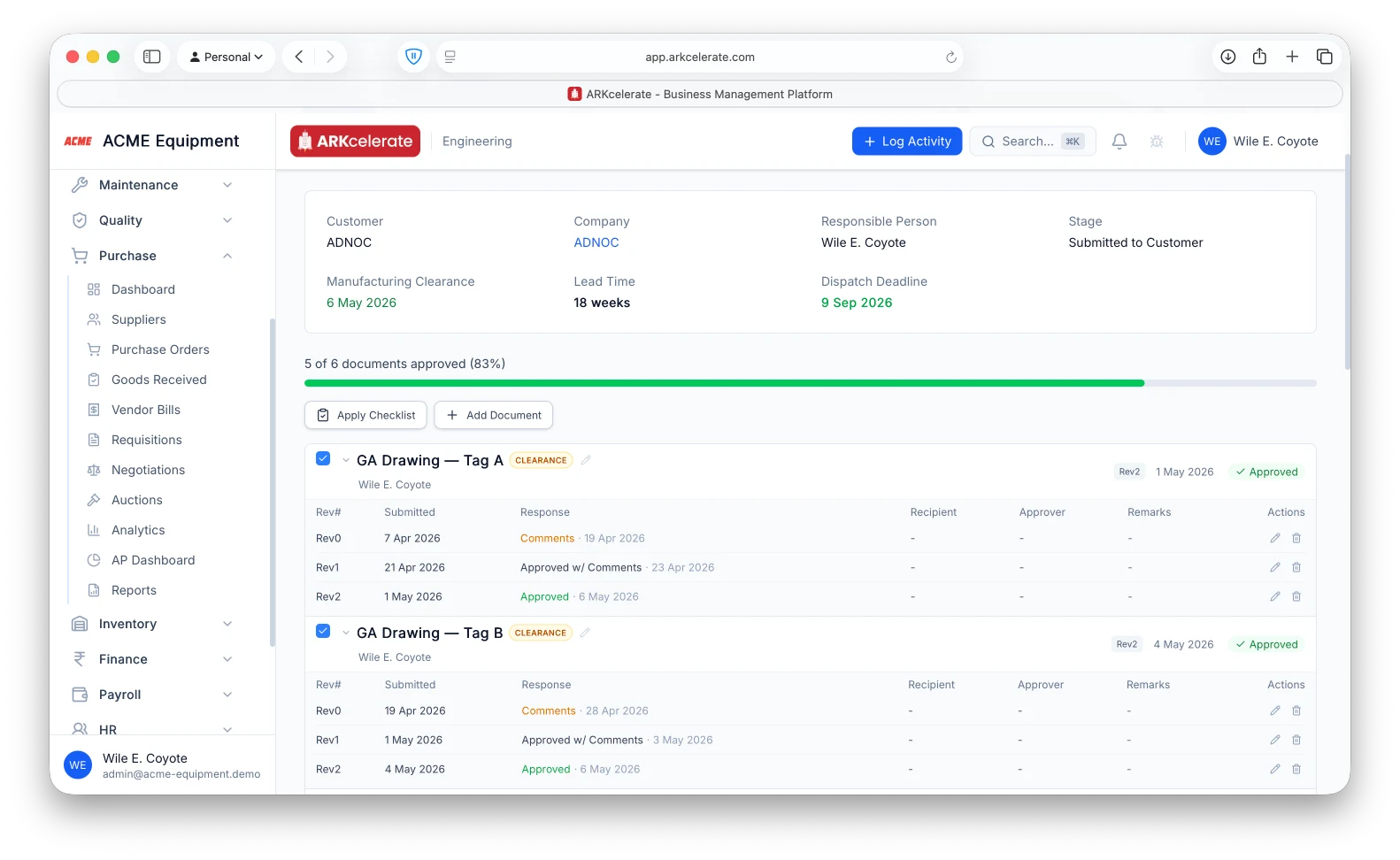
- Per-revision audit trail — Submitted date, Response (Comments / Approved w/ Comments / Approved), Response date — captured automatically for every rev of every doc
- Locate the bottleneck instantly: was the wait on our engineer or on the customer’s reviewer?
- Manufacturing Clearance Date stamped the moment the critical (clearance-tagged) document is fully approved
- Dispatch Deadline = Manufacturing Clearance Date + Lead Time, where Lead Time flows down from the opportunity in CRM
- Dispatch Deadline shown on the project and visible to Manufacturing, Purchase, Inventory and Quality
- One project, one deadline — every module reads the same number, with no spreadsheet in between
Feature 04
A leaderboard that turns drawing prep into a team scoreboard.
Customer-approval work is one of those quiet engineering disciplines where the people who keep things moving rarely get visible credit. The Customer Approvals leaderboard fixes that. Every drawing prepared, revision filed, CRS resolved, customer call attended and comment closed earns points — and the team sees who’s leading on the board. It’s how you measure productivity on document submission without falling back to weekly spreadsheet reports. And the points table itself is yours to tune: drawing prep at 25 pts, revision at 15, customer email at 5, in-person customer meeting at 20 — change any of these in settings to match what your shop values.
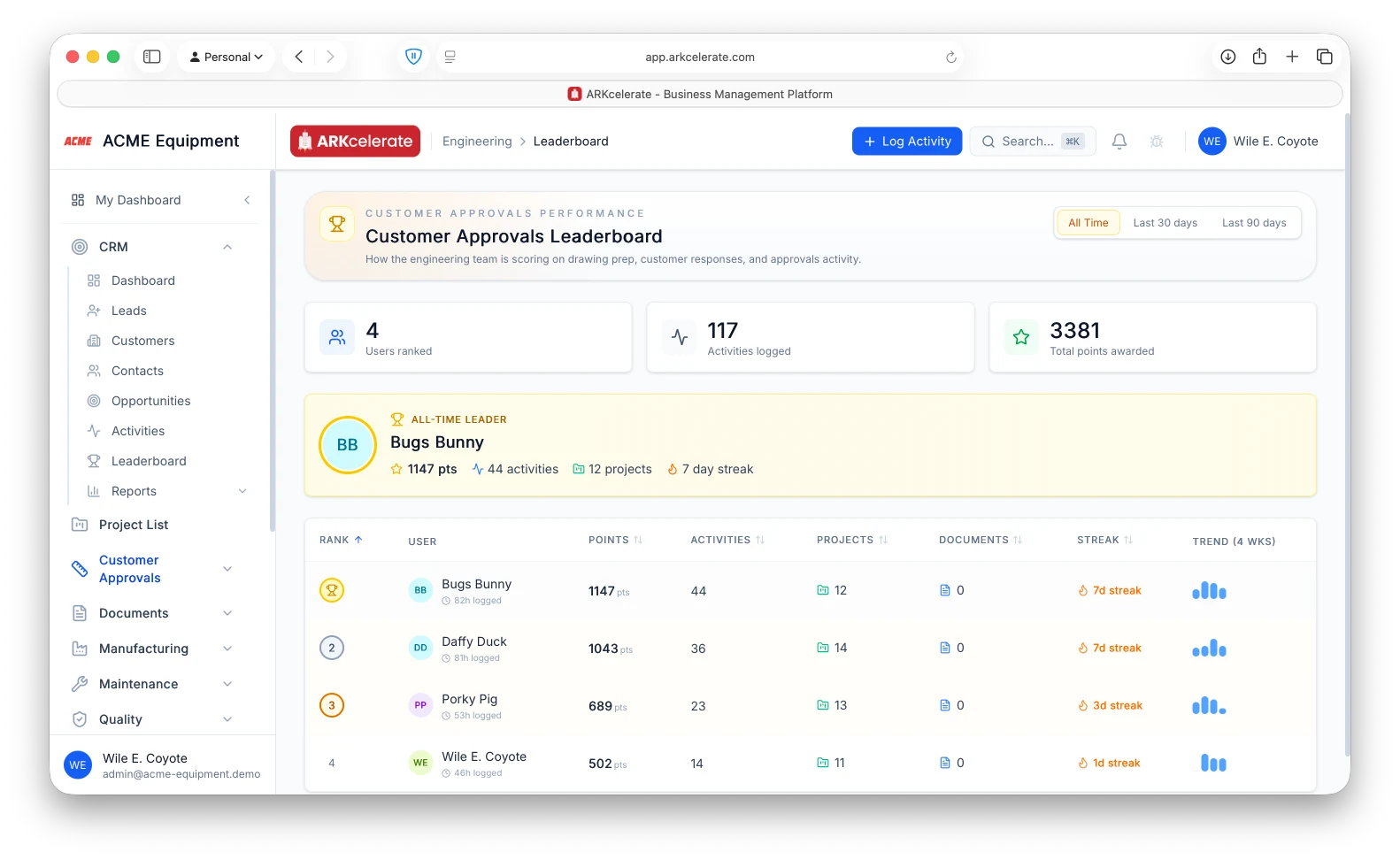
- Per-user points, activity counts, projects worked, documents touched and hours logged — all in one row
- Champion banner highlights the all-time / last-90 / last-30 day leader with their stats up front
- 4-week trend sparkline shows who’s heating up vs cooling off at a glance
- Streak tracking — consecutive days with logged activity, surfaced in orange the moment it hits 5+ days
- 9 default activity types out of the box (New Drawing Prep, Drawing Revision, QAP, Design Calcs, Manufacturing Drawing, Customer Meetings, Email Replies, CRS) — add your own anytime
- Customisable point weights per activity type in Settings — your scoring matches your shop, not ours
- Duration, project-link and document-link bonuses stack on top of the type weight — rewards depth, not just volume
Feature 05
Coach the team and the individual — with the data to back every conversation.
A manager’s job is to spot who’s flying, who’s steady, and who could use a little support — and then have the right conversation with each person. The Team Performance report gives the data to make those conversations precise. Every engineer gets their own card with last-14-day activity vs the prior 14 days, a daily-rhythm sparkline for the past 30 days, and a per-activity-type breakdown — Drawing Revision, CRS Filling, Customer Meeting, Reply to Email, and so on — each with its own delta. ARKcelerate tags every person with one of five trend bands so the team’s shape is visible at a glance, and the manager can recognise accelerators, balance workload across the bench, and offer help where it lands well.
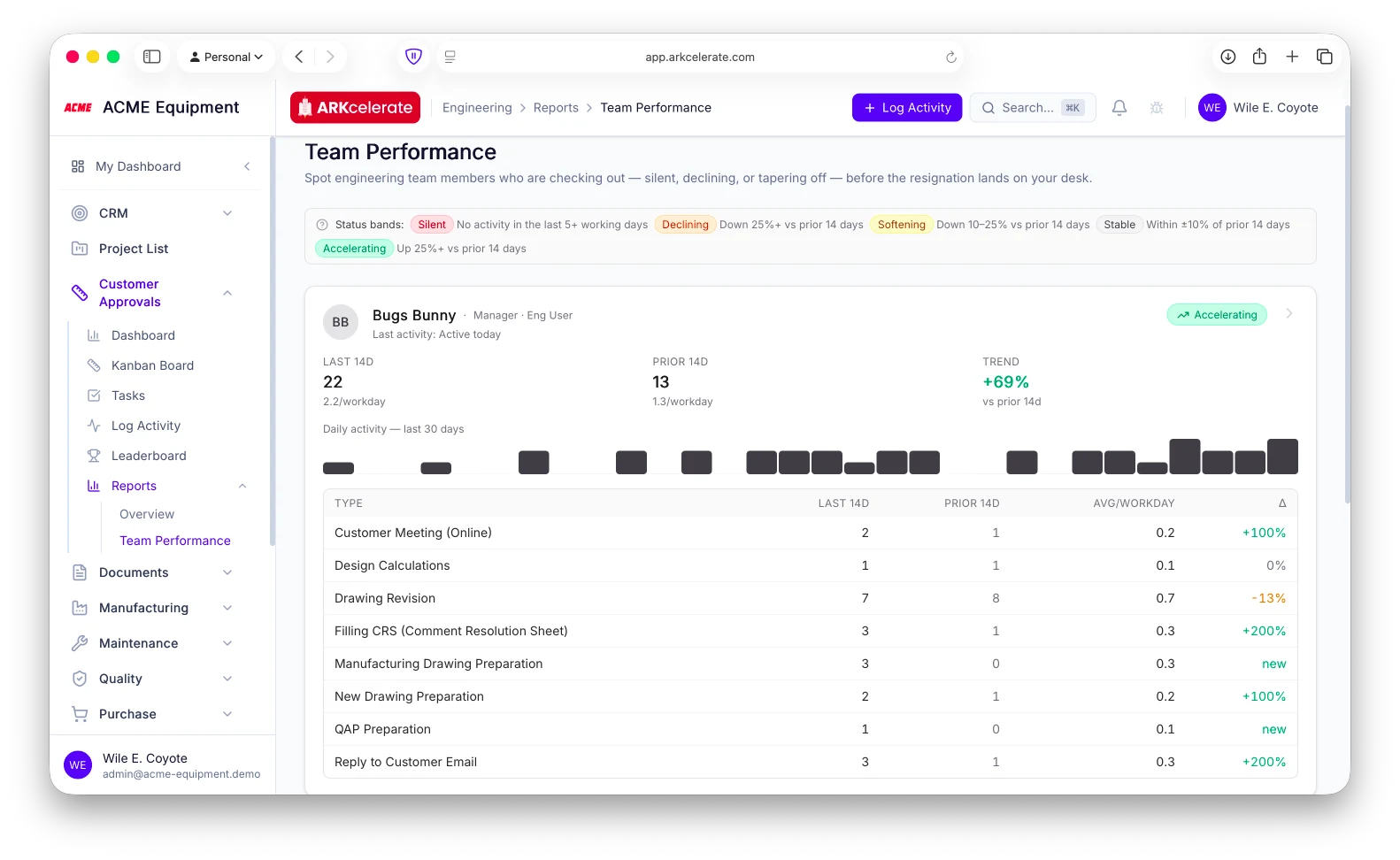
- Per-engineer card: last 14d count, prior 14d, % trend, current status band, last-activity timestamp
- Daily-activity sparkline for the past 30 days — the rhythm of when each person works, not just totals
- Per-activity-type breakdown: Drawing Revision, CRS, Customer Email, Mfg Drawing — last 14d vs prior 14d with delta
- 5 trend bands with colour-coded pills — Accelerating, Stable, Softening, Declining, Silent — so accelerators are easy to spot and quieter weeks easy to support
- One activity log feeds both the Leaderboard and the Performance report — gamified for the team, analytical for the manager
- Click into any engineer for a full activity timeline, project + document drilldown, and historical trend
- Designed for the 1:1 — managers walk into every conversation with the data already pulled together
Feature 06
Automated tasks that fire on the right trigger and clear themselves when the work’s done.
Customer-approval work has predictable rhythms — submit a drawing, follow up if the customer goes silent, address the comments when they arrive, resubmit. It watches each project and drops the right task on the right person’s board at the right moment. When a drawing has been with the customer past the silence threshold, a "Follow up on submission" task appears on the engineer’s queue. When the customer files comments, an "Address comments" task lands automatically — bumped to Critical if it’s already past the response window. The engineer never has to remember to maintain their own task list. And the moment they mark the next revision as submitted, the matching automated task auto-completes — no clicking "done" on something the system already knows is done.
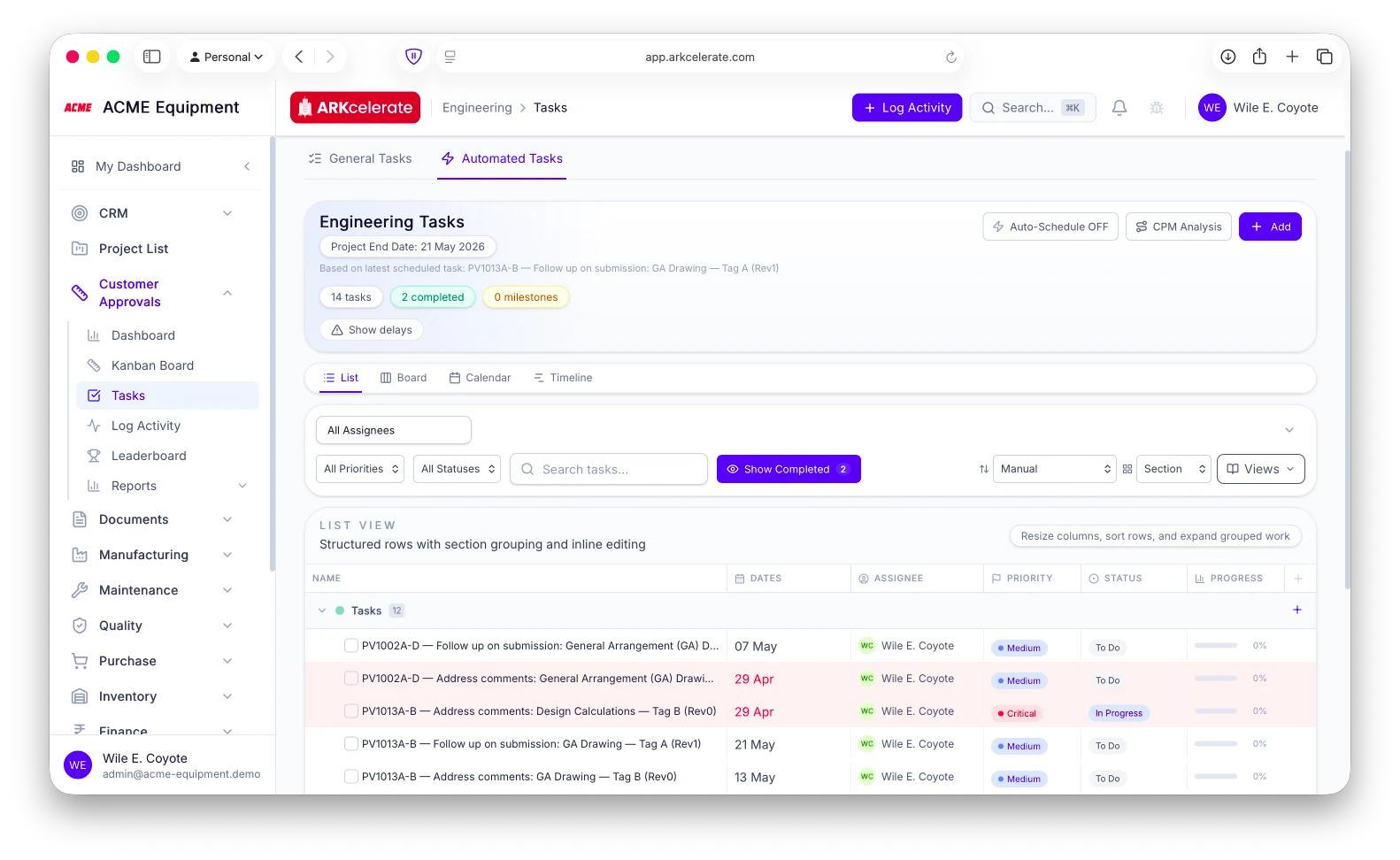
- Two tabs in the project task view — General Tasks (manual) + Automated Tasks (system-generated)
- "Follow up on submission" auto-created when a drawing has been with the customer past the configured silence threshold
- "Address comments" auto-created the moment customer comments arrive, escalated to Critical priority if past the response window
- Automated tasks auto-complete when the engineer marks the next revision as submitted — closure mirrors the action
- Each task carries the project code, drawing name, revision number, assignee and due date — context already on the card
- Auto-Schedule + CPM analysis slots automated tasks into the project’s critical path
- List, Board, Calendar and Timeline views over the same automated tasks — pick whichever your team works in
- Inline "Show delays" so any automated task running late surfaces without filtering
The project-based manufacturing angle
Customer sign-off is the contract event everything else hangs on.
Customer sign-off is the event the schedule hangs on. The moment your customer approves the critical drawing, The system stamps the manufacturing clearance date, computes the dispatch deadline from the lead time you quoted, and clears the floor to build to that approved revision — all traceable back to the single approval record. The shop floor builds to the approved version, not a draft, and the full revision trail is one query away.
Everything in the module
The full Customer Approvals feature list.
Grouped by functional area. Every feature below is included in every plan — no paywalled tiers, no “enterprise edition” unlocks.
| Area | Features |
|---|---|
| Project drilldown & document tracking |
|
| Customer-approval workflow |
|
| Reminder cadence |
|
| Kanban board |
|
| Audit trail & timestamps |
|
| Document revisions |
|
| Revision-locked production |
|
| Automated tasks |
|
| Dashboard |
|
| Leaderboard |
|
| Team Performance report |
|
| Activity logging |
|
| Multi-project + multi-team |
|
Try Customer Approvals alongside every other module.
One signup. Full feature access during your trial.