
Know who holds every asset, and who signed for it.
Laptops, machines, vehicles and software licenses on one register — assigned to people, tracked from purchase to disposal, with insurance reminders and warranty-expiry tracking.
What makes it unique
The features that set Assets apart from a generic ERP.
These are the workflows big ERPs either skip or get wrong.
Self-service requests, approved in one click
Anyone can raise an asset request with a category, priority and justification. It gets an AR-number and lands in an approval queue; approve or reject from the list, then fulfil it by issuing a matching asset — the whole trail recorded.
Depreciation & book value
Set a method (straight-line or written-down-value), useful life and salvage value per asset, and the register shows the estimated book value after depreciation — no separate spreadsheet to keep.
Employee acknowledgment workflow
Issuing a laptop to an employee records the custody and captures their acknowledgment of receipt. Returns capture the condition and close out the assignment.
Insurance + warranty registry
Per-asset insurance policies with provider, coverage, premium, deductible and renewal date; warranty start/end tracked on the asset. Renewal reminders fire 60 and 30 days before a policy lapses.
Per-asset maintenance history
Every maintenance entry on the asset — preventive, corrective or breakdown — is logged with its cost and vendor, so the running spend on a unit is one view away.
Disposal with audit trail
Scrap, sale, donation, return-to-vendor — each disposal records the method, proceeds, the authoriser and a disposal certificate, and the asset is retired from the active register.
Feature 01
Manage every asset from one command center.
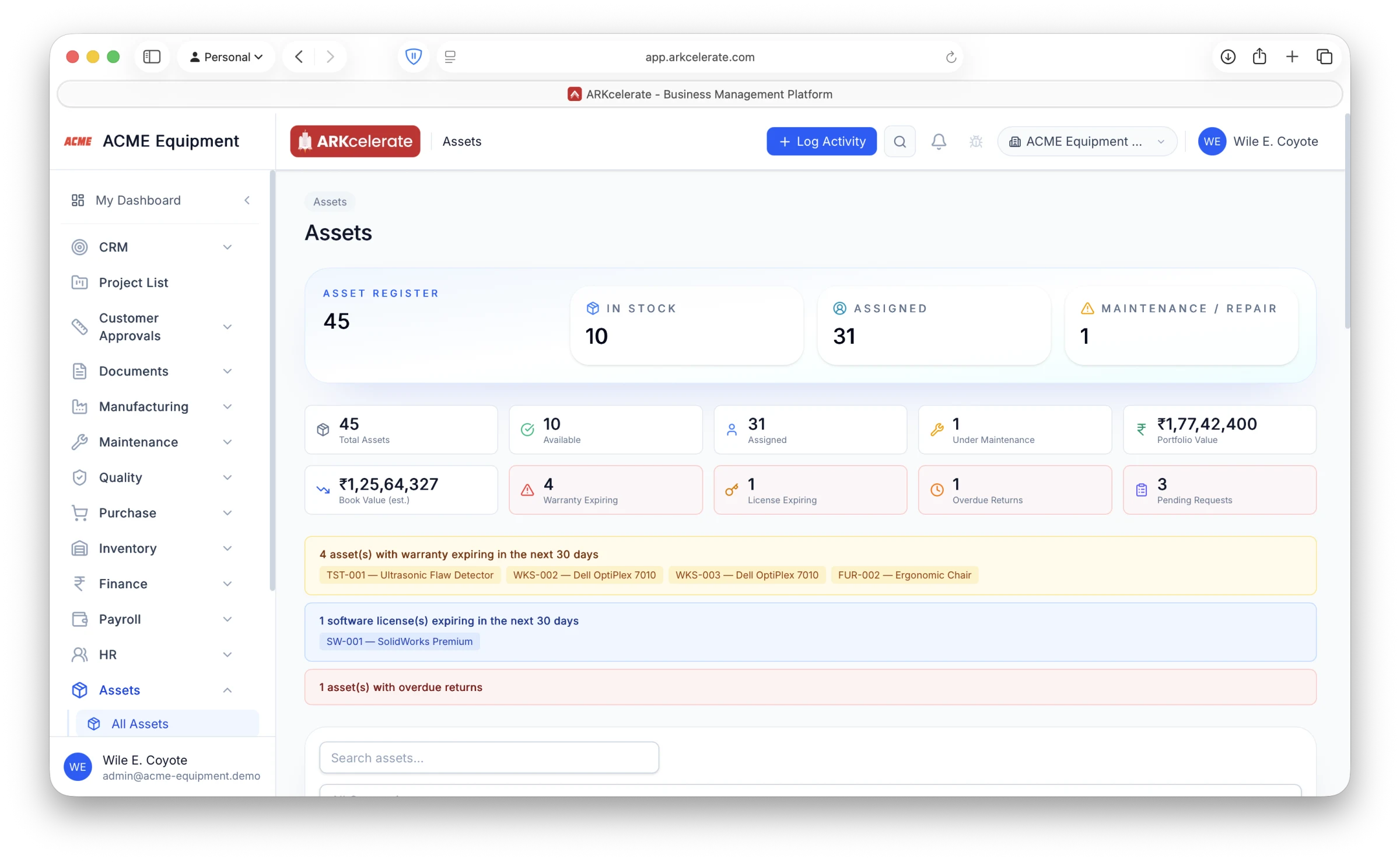
Laptops, instruments, vehicles, machines and software licenses — all on one register, each tracked from purchase to disposal. The dashboard tells you in a glance how many assets are in stock, assigned and under maintenance, what the portfolio and depreciated book value are, and what needs attention right now: warranties and licenses expiring in the next 30 days, overdue returns, and pending requests. Drill from any tile straight into the asset.
- Live counts: in-stock vs assigned vs under maintenance
- Portfolio value and estimated book value after depreciation
- Proactive alerts — warranty, license and return due dates
- Pending asset requests queued for approval
- Search and filter the full register by class, status or assignee
Feature 02
Assign assets to employees — and let them acknowledge receipt.
Issue a laptop, phone, instrument or any asset to an individual employee and it moves to “assigned” on the register with the custody recorded. Each employee gets a personal “My Assets” page showing exactly what they hold — tag, category, serial number, condition and warranty status — and confirms custody with one tap on “Acknowledge Receipt”. You always know who has what, in what condition, and whether they’ve formally accepted it.
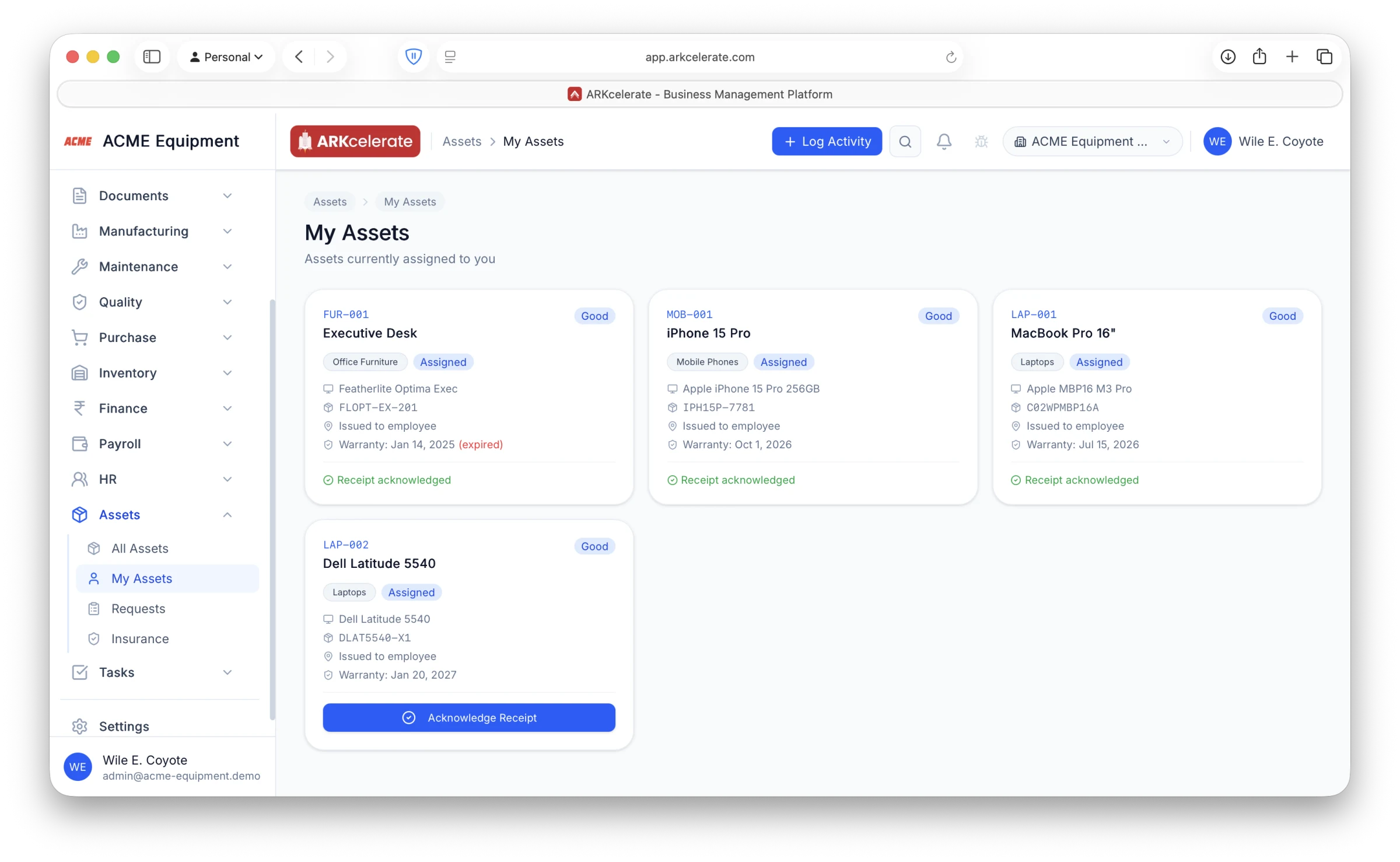
- Per-employee “My Assets” view of everything they hold
- One-tap receipt acknowledgment captures custody sign-off
- Condition and warranty (incl. expired flag) shown per asset
- Status flips to Assigned automatically and updates the register
- Returns trigger a condition check and close out the assignment
Feature 03
Employees request what they need — managers approve in one click.
Anyone can raise an asset request — a laptop for a new joiner, a replacement tool for a failed unit, a second instrument to clear a bottleneck — with a category, priority and justification. Every request gets a tracking number and lands in a single queue where approvers see who asked, for what, and why. Approve or reject right from the list, then fulfil the request by issuing a matching asset, with the whole trail recorded.
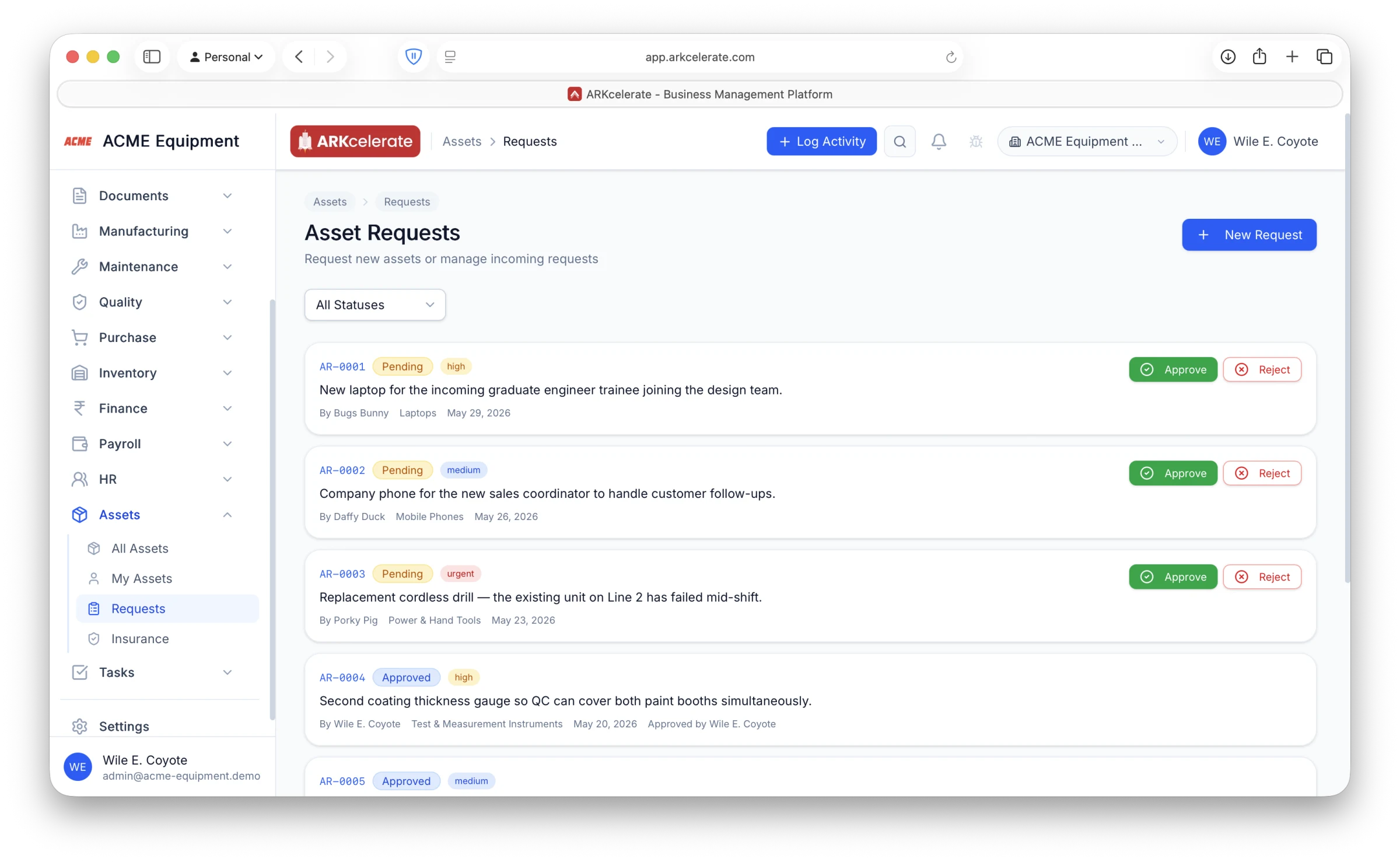
- Self-service requests with category, priority and justification
- Auto-numbered (AR-0001…) and status-tracked end to end
- One-click approve / reject straight from the queue
- Priority flags — low, medium, high, urgent — surface what’s critical
- Approved requests fulfil by issuing an asset, closing the loop
Feature 04
Track every asset insurance policy in one place.
Fire & special perils, machinery breakdown, electronic equipment, motor, marine/transit, burglary — every policy that covers a company asset, linked to the exact asset it protects. See coverage, premium, provider, deductible and renewal date at a glance, with live counts of active policies and how many are expiring soon. Filter by category or status, and never let a policy lapse: reminders fire 60 and 30 days before expiry.
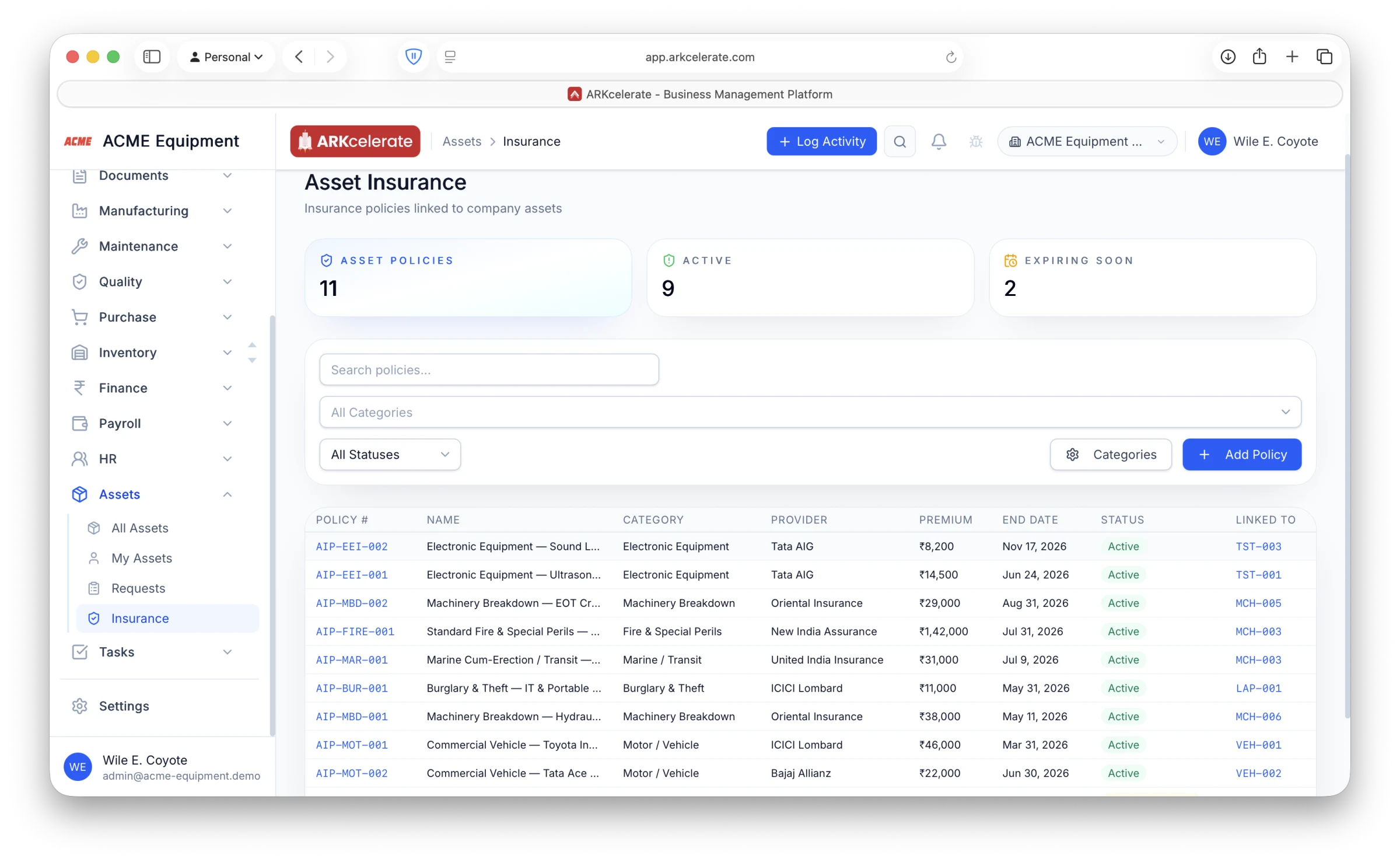
- Policy categories for every asset risk you carry
- Each policy linked to the asset it covers (LAP-001, MCH-005…)
- Coverage, premium, deductible, provider and renewal date tracked
- “Active” and “Expiring soon” counts surfaced up top
- Automatic 60- and 30-day renewal reminders so nothing lapses
The project-based manufacturing angle
You always know who holds what — and whether they’ve signed for it.
Every asset issued to an employee shows on their personal “My Assets” page with its condition and warranty, and they confirm custody with a one-tap acknowledgment. The register stays accurate as equipment is issued, returned and reassigned, and the full assignment history is preserved on every asset.
Everything in the module
The full Assets feature list.
Grouped by functional area. Every feature below is included in every plan — no paywalled tiers, no “enterprise edition” unlocks.
| Area | Features |
|---|---|
| Asset registry |
|
| Assignments |
|
| Depreciation |
|
| Maintenance log |
|
| Insurance & warranty |
|
Try Assets alongside every other module.
One signup. Full feature access during your trial.